Need help?
Most frequently asked questions
4fund.com is a free online platform where anyone can create a fundraising campaign for any purpose, including social, medical, business, personal and charitable goals. It is run by the Polish company Zrzutka.pl sp. z o.o. – the leading crowdfunding site in Poland with over 12 years of experience.
It only takes a few minutes to create a fundraiser. Prepare your fundraiser, share it on social media to encourage donations and start collecting funds.
A fundraising campaign can be organised by any European Economic Area resident over the age of 18.
The European Economic Area includes European Union countries (Austria, Belgium, Bulgaria, Croatia, Republic of Cyprus, Czechia, Denmark, Estonia, Finland, France, Germany, Greece, Hungary, Ireland, Italy, Latvia, Lithuania, Luxembourg, Malta, Netherlands, Poland, Portugal, Romania, Slovakia, Slovenia, Spain and Sweden) and also Iceland, Liechtenstein and Norway.
On 4fund.com you can raise funds for almost anything, as long as it complies with the law. You can collect money for charity, as well as for your private goals like gifts, trips, veterinary costs and many more.
We do not judge your fundraiser’s purpose based on political or social beliefs. It is up to donors to decide whether they want to support your fundraiser. Still, there are some activities that are prohibited on 4fund.com – read more.
It's completely free! Creating and running a fundraiser, as well as making donations, is 100% free for both organisers and donors. We do not charge any mandatory commissions on donations or withdrawals, meaning the full amount goes directly to the fundraiser.
To keep our platform free, both donors and organisers can support us with a voluntary tip during the donation or withdrawal process, but it is never required.
All official emails from 4fund.com are sent exclusively from @4fund.com and @mail4fund.com domains. If you receive a message claiming to be from 4fund.com from a different domain, do not click any links and report it to us at [email protected]. To make sure our emails reach your inbox, we recommend adding these domains to your trusted senders list.
Yes. As a Licensed Payment Services Provider we are obliged to ensure the highest safety standards for your payments and data.
Find out more at the 'Safety & security' tab.
At 4fund.com, we follow a number of requirements and procedures to ensure that your data and your funds are safe. We have also prepared a list of the most important rules for using our fundraising platform safely.
Read this article on our blog to learn how to avoid online scams and keep your money safe.
General
4fund.com is a free online platform where anyone can create a fundraising campaign for any purpose, including social, medical, business, personal and charitable goals. It is run by the Polish company Zrzutka.pl sp. z o.o. – the leading crowdfunding site in Poland with over 12 years of experience.
It only takes a few minutes to create a fundraiser. Prepare your fundraiser, share it on social media to encourage donations and start collecting funds.
A fundraising campaign can be organised by any European Economic Area resident over the age of 18.
The European Economic Area includes European Union countries (Austria, Belgium, Bulgaria, Croatia, Republic of Cyprus, Czechia, Denmark, Estonia, Finland, France, Germany, Greece, Hungary, Ireland, Italy, Latvia, Lithuania, Luxembourg, Malta, Netherlands, Poland, Portugal, Romania, Slovakia, Slovenia, Spain and Sweden) and also Iceland, Liechtenstein and Norway.
On 4fund.com you can raise funds for almost anything, as long as it complies with the law. You can collect money for charity, as well as for your private goals like gifts, trips, veterinary costs and many more.
We do not judge your fundraiser’s purpose based on political or social beliefs. It is up to donors to decide whether they want to support your fundraiser. Still, there are some activities that are prohibited on 4fund.com – read more.
Setting up a fundraiser
You can create fundraiser in a few seconds by filling out the form on our home page.
Take a look at our guide 'How to organise a fundraiser successfully? Guide and checklist for Organisers' in which we described the first steps on 4fund.com, and familiarise yourself with fundraiser editing instructions.
Choosing the right image for a fundraiser cover can be crucial in attracting potential Donators and creating a positive impact for your cause.
Consider the following:
- Relevance: The image should be relevant to your cause and clearly communicate the message you want to convey.
- Emotion: The image should evoke emotions that align with your cause and encourage people to donate.
- Quality: The image should be of high quality and visually appealing. Poor quality images can detract from your message and may not encourage people to donate.
- Originality: If possible, choose a unique image that stands out from others. This can help your fundraiser get noticed and make a greater impact.
Ultimately, the image you choose should inspire people to donate your cause and feel good about donating to it.
And one more thing - the cover of your fundraiser doesn't have to be an image - you can also use a video. You can include the video in your fundraiser gallery via an external link - it's not possible to upload it directly to 4fund.com. In order to place a film in the gallery of your fundraiser, upload it to any external portal (e.g. Youtube) and use the option 'Add video via url'.
The title of your fundraiser is an important part of your campaign as it's one of the first things potential Donators will see. A good title should be clear, concise, and compelling. Here are some tips to help you come up with a great title for your fundraiser:
- Be specific: Your title should clearly convey the goal of your fundraiser. For example, instead of 'Help Us Raise Money', try 'Fundraising for Local Animal Shelter.'
- Use emotive language: Choose words that elicit emotions and encourage people to take action. For example, 'Support Children's Education in Urban Areas' is more compelling than 'Raising Funds for Schools'.
- Make it catchy: A catchy title can grab people's attention and encourage them to learn more about your fundraiser. Try using alliteration, rhymes, or puns to make it more memorable. Keep it short: Your title should be short and easy to remember. Ideally, it should be no more than 10 words.
- Highlight the impact: If possible, include the positive impact that your fundraiser will have on your cause. For example, 'Help us Feed 100 Homeless People This Thanksgiving'.
- Use relevant hashtags: Use relevant hashtags to increase the visibility of the post and reach a wider audience. Examples of relevant hashtags could be the name of the organisation, the name of the cause, or a general hashtag for charitable giving. Examples: #Billy'sHeart, #TeamGeorge
The description of your fundraiser is an important element which can help Donators really understand the goal of your fundraiser, specifically why it’s important. We have compiled a list of our recommendations of what to include:
- Make it personal- share your personal story that helps to illustrate why this is important, this helps Donators connect emotionally and empathise.
- Keep it well divided into paragraphs so that it is easy to read-people can be discouraged by a big volume of text that is not organised or easily digestible.
- Opt for multimedia! Intersperse your description with images, videos, graphics... you are only limited by your imagination!
- And most importantly - tell the truth. Your fundraiser will be seen by both strangers and acquaintances. The latter will be able to catch the odd inaccuracy very quickly so transparency is key.
Interruption of the fundraiser does not involve any financial consequences.
Editing the fundraiser
As an Organiser, you have many options to edit your fundraiser. You can add basic information such as target amount, image and description, or you can expand it a bit more by adding useful links, location, news, rewards and rewards posts. All settings related to the above-mentioned functionalities you can find in the fundraiser view.
After logging in, the Organiser sees their fundraiser slightly differently than other users - along with all editing options (they are marked with a pencil or gear icon).
We have described each of the editing options in more detail in separate sections. Click below to find out exactly how to edit:
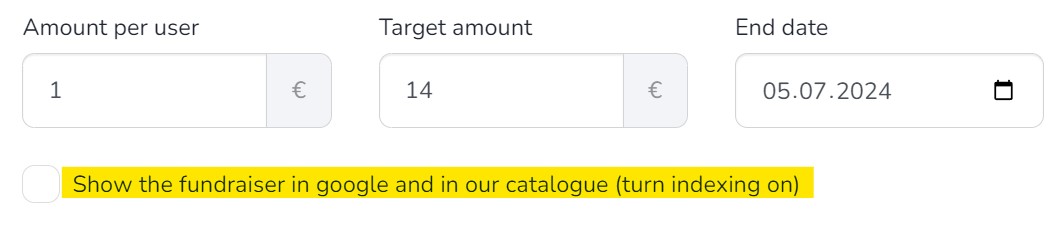
At 4fund.com we understand the need to be careful with your information due to privacy concerns. Switching to a private fundraiser means that your fundraiser will be removed from public search directory and will only be visible to those with whom you have shared your fundraiser link. However, please keep in mind that if your fundraiser's direct link is posted on social media accounts, such as Facebook, WhatsApp etc. anyone who clicks on your fundraiser link will be able to access the fundraiser. To create a private fundraiser, just uncheck the checkbox in the window for editing the basic information of the fundraiser 'Show the fundraiser in Google and in our catalogue (turn indexing on)'. This will make your fundraiser visible only to people you share the link with.
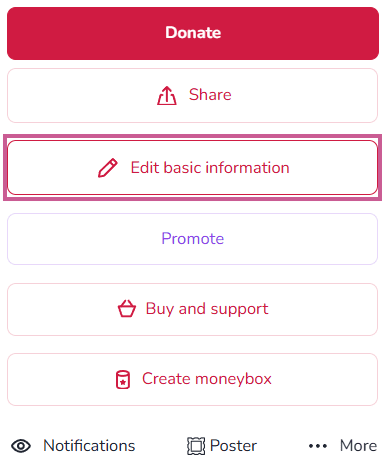
Once you log in to your fundraiser's page, you will see a button 'Edit basic information' on the right side of the image.
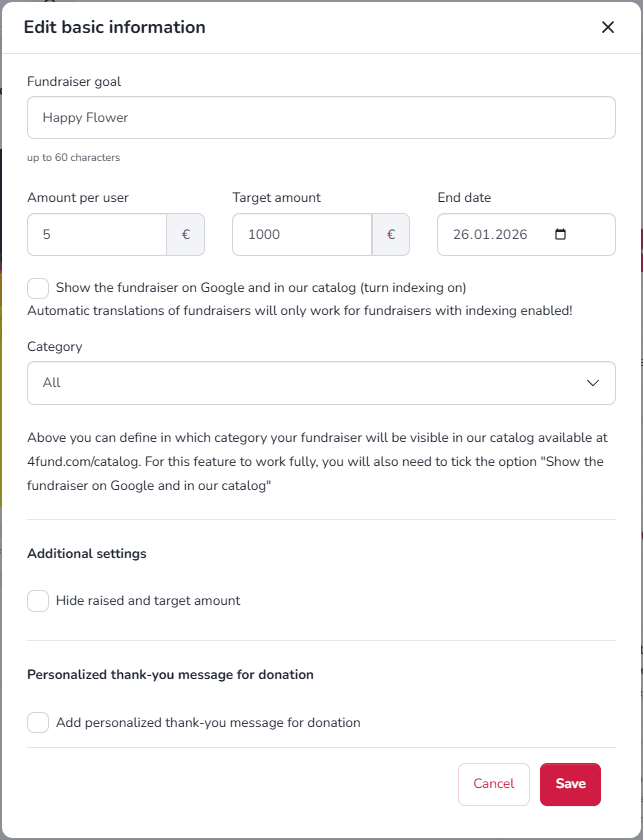
Clicking on it will allow you to edit the following data:
- The goal of the fundraiser, which is its title. In this section, you should write a headline that will be visible in the directory and preview. The goal should be short and catchy - a detailed description of what the funds is being raised for should be included in the fundraiser's description.
- Minimum donation amount, which refers to the smallest or lowest amount of donation that can be donated to a particular cause. The total amount is the sum you want to raise and can also be hidden from Donors - just check the checkbox.
- End date of the fundraiser - it is set to 90 days by default, but you can change it at any time.
- By checking the 'Show the fundraiser in Google and in our catalogue (turn indexing on)' checkbox, you will allow it to be displayed in our fundraisers catalogue and in search engines such as Google.
- Category is the tab in our directory where your fundraiser will be displayed.
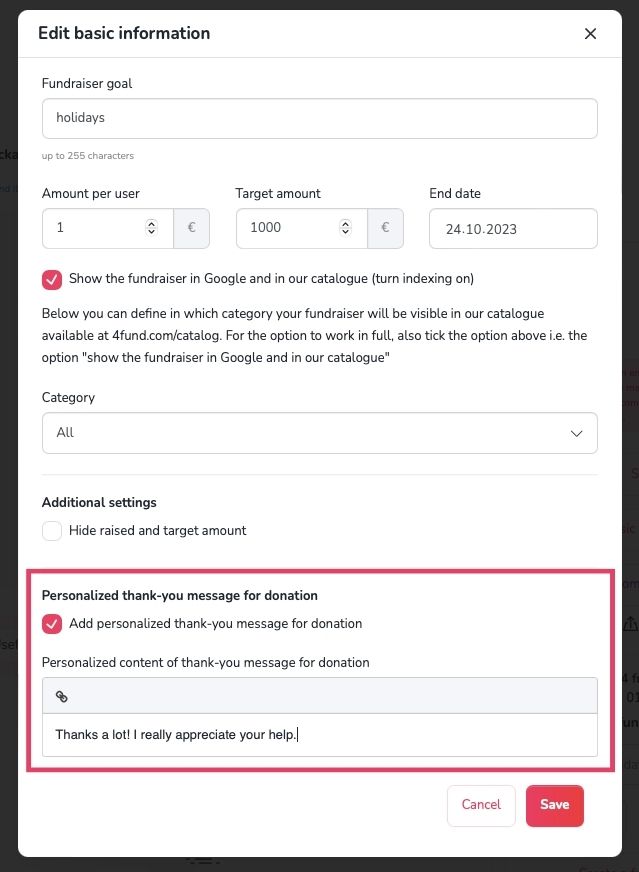
- Thank you message for Donors - after checking the appropriate box, a field will expand where you can enter your own thank you message that will be displayed to every Donors after they make a donation to your fundraiser. In the thank you message, you can also add a link (e.g. to a YouTube video or images gallery) - to do this, select the text that should lead to the opening of the page and click the icon visible in the upper left corner of the text field.
After you finish editing, click 'Save' to save the changes.
You can let your Donators know where you are by adding your location to your fundraiser. To do this simply click the pencil icon in the "Location" just below the fundraiser description.
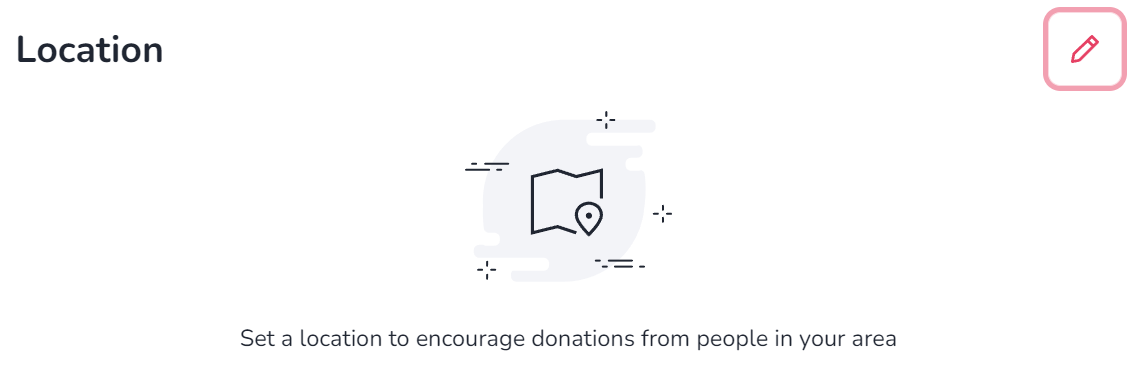
You can enter the location in the search bar or mark it on the map with a pin.
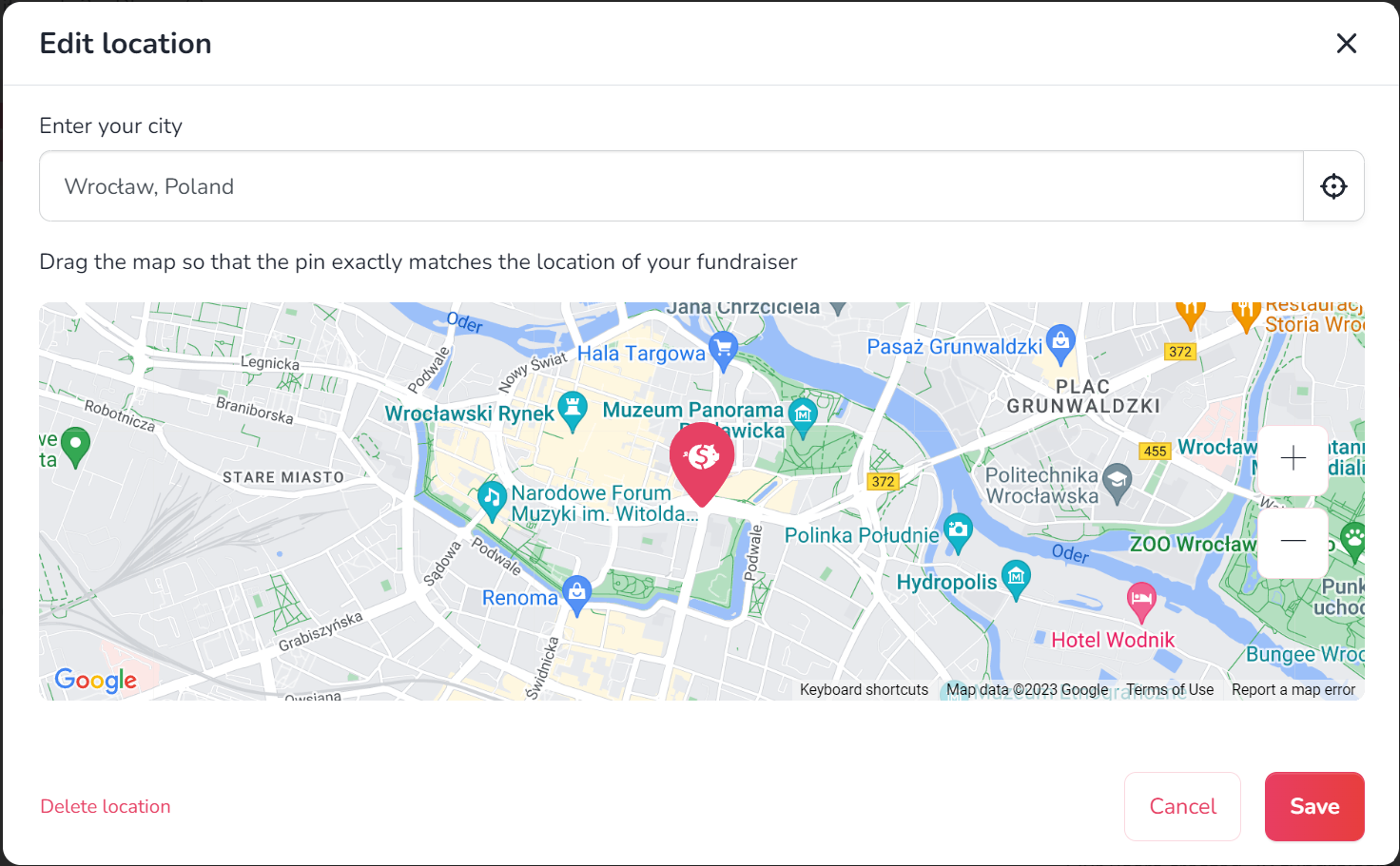
Possible Donators can find your fundraiser by its location in fundraisers catalogue using location search.
To edit the description of your fundraiser, log in and click the pencil icon in the upper right corner of the description field.
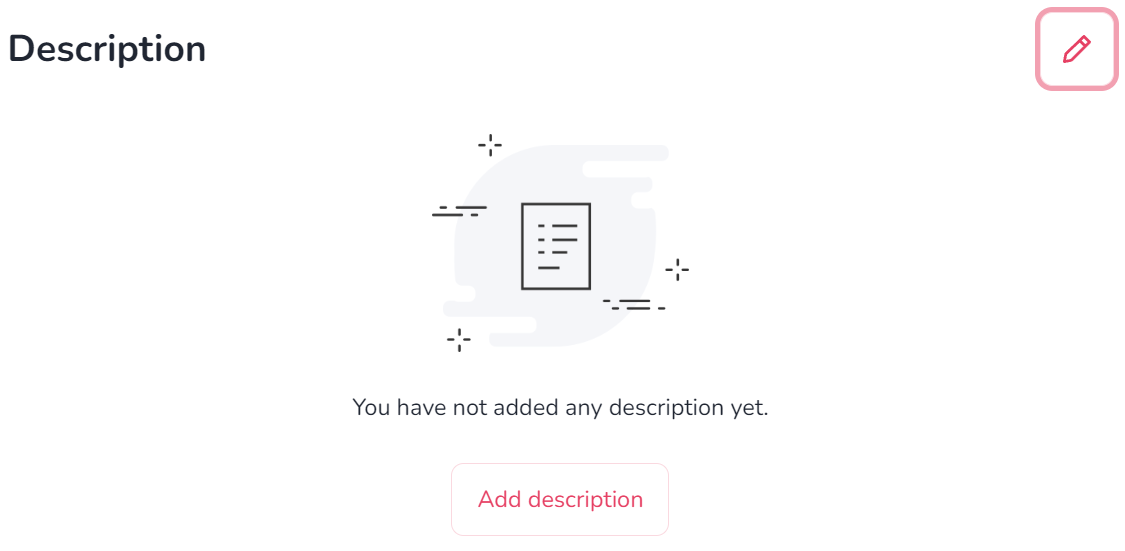
In addition to text, you can include image (image icon) or videos (film strip icon) in the description. Clicking the icon with the letter B will bold the highlighted text. To the right, there is an icon for adding a hyperlink, which is a link that will open when the selected text is clicked.
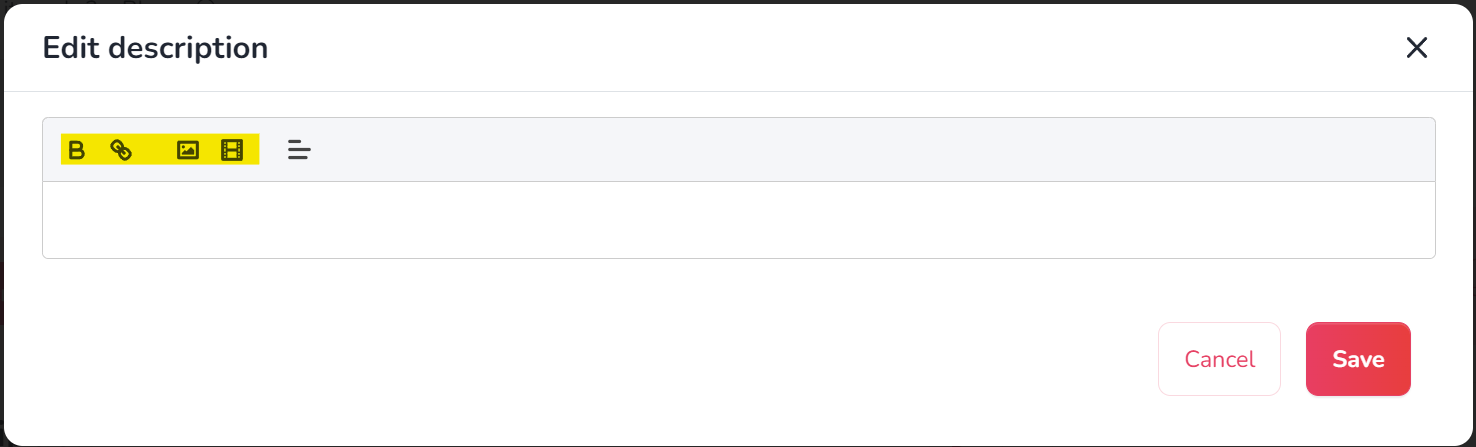
- If your fundraiser does not have any image yet, use the 'Add media' option:

- If you want to add additional images to a fundraiser that already has media, click the pencil icon in the top right corner of the image.

- When adding a image, a menu will appear where you can upload a image from your computer or add a URL of a video that you want to display in the fundraiser's gallery.
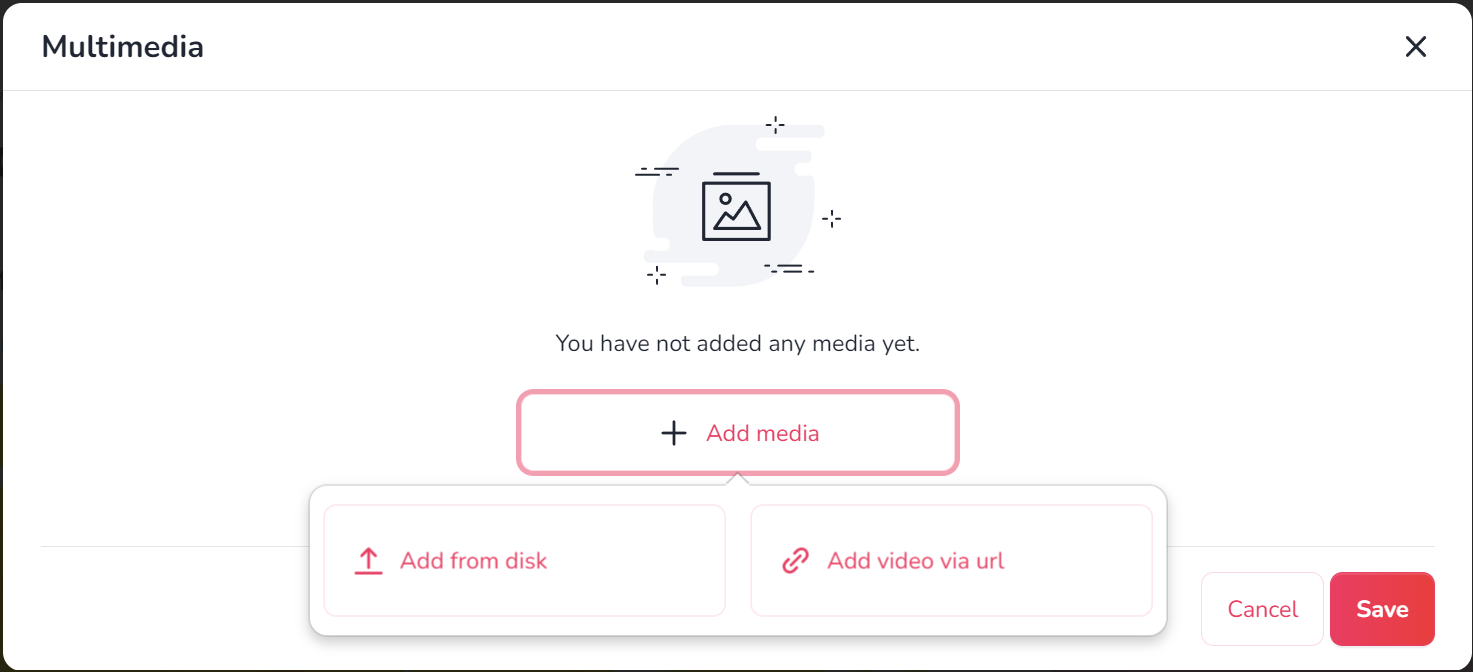
- A good image should have a minimum size of 750 x 420 px. When adding a image, you can also rotate it and crop it using a slider to make it look its best on the fundraiser.
- At this point, you can also change the order of media in the gallery by moving them. The first image or video will be displayed in the preview of your fundraiser.
After finishing the editing, click 'Save' to save the changes.
A list of Donators is just below the moneyboxes in the view of your fundraiser.
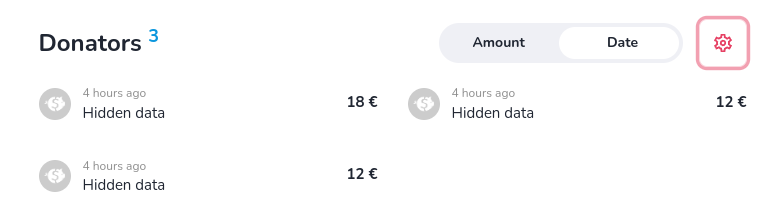
There, you can easily change the way donations are sorted - from the most recent or from the highest deposit. In addition, by clicking on the gear icon, you can also hide the amount or details of all your donates, as well as enable recurring donations.
You can change the target amount of your fundraiser freely in the 'Edit basic information' section of your fundraiser page.
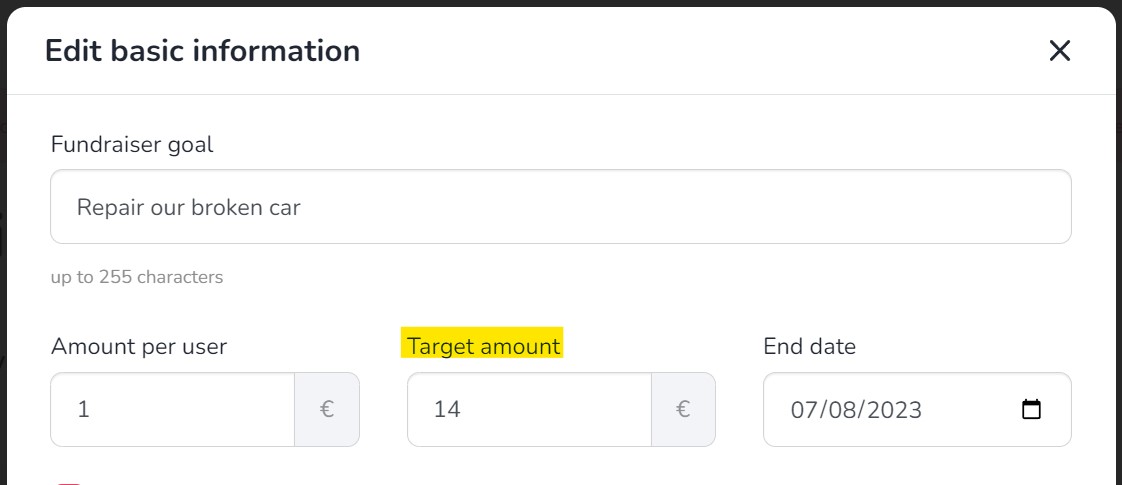
In case the description of your fundraiser has already been verified and the editing of the description has been blocked, in order to increase your fundraiser target please contact our customer service.
Fundraiser management
After logging into your profile, you will only see the option to withdraw to a payment card. If you experience any issues with this, please contact us - we will guide you on how to withdraw funds via a traditional bank transfer to your bank account.
You can find the updates functionality right below the description field. To add updates, click on the '+' button. After adding the first content, the updates section will automatically move above the description.

You can find the comment settings by clicking on the gear icon in the 'Comments' section at the bottom of your fundraiser view. As an Organiser, you can decide who can add comments (everyone, only Donators or no one) and delete comments that you consider unwanted. Like any other user, you can also add your comments, replies to other comments, and reactions with emoticons.

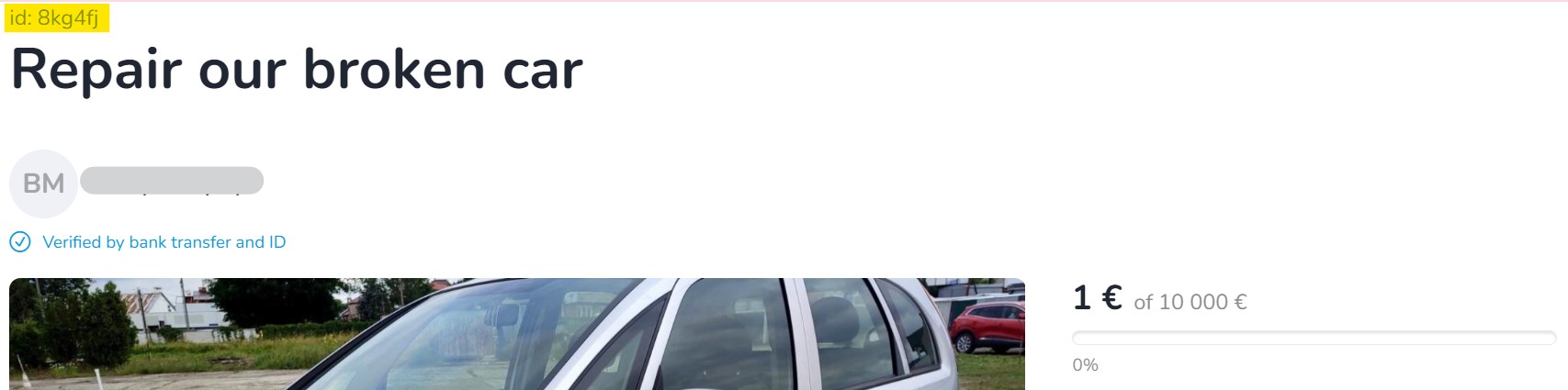
Every fundraiser created on our portal receives its individual ID number, a unique string of six characters. You will always find the ID number of a fundraiser just above its title.
You can view Donators details by generating a donations summary (even for anonymous and unregistered Donators). Just go to 'My fundraisers' tab -> click '...More' -> 'Finances' -> and 'Export XLS file'.
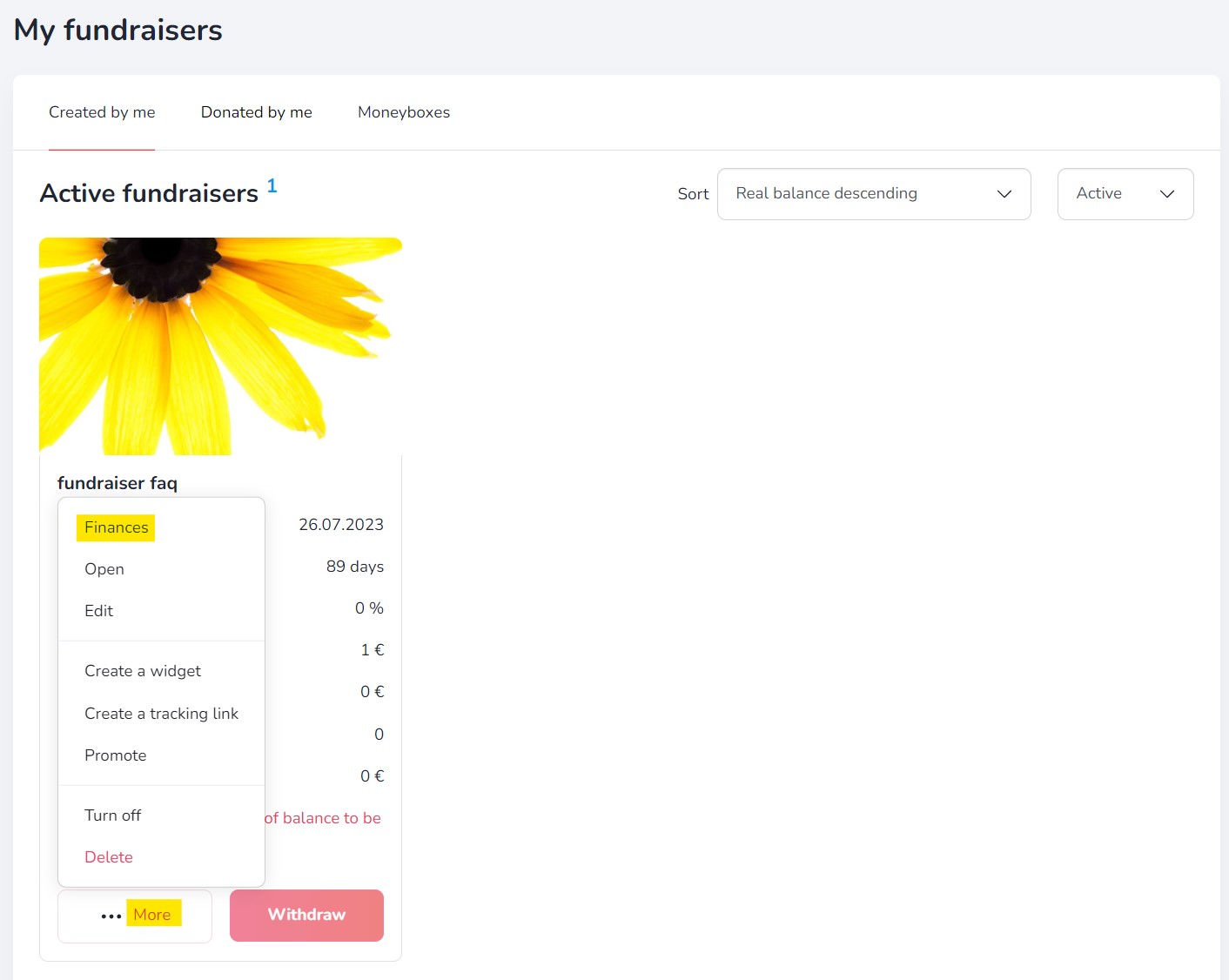
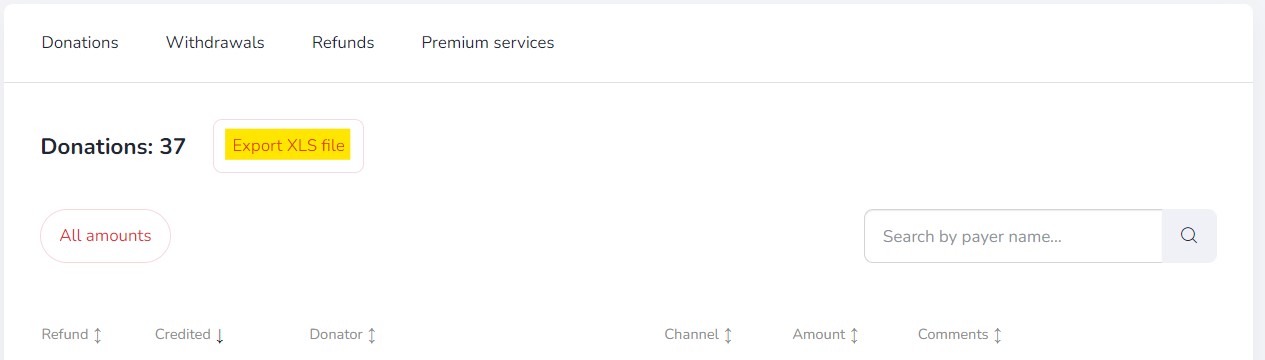
In the donation summary you will find a complete list of Donators to a given fundraiser, including the amount of the donation, the payment method, the email address given when making the donation and other data (if available).
Additional features
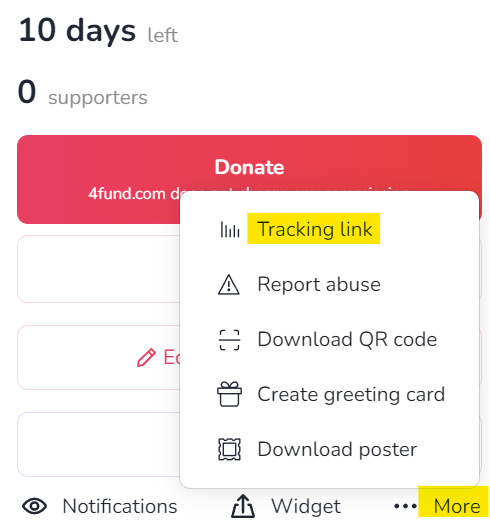
If you want to create your own tracking link that will show you statistics of clicks and donations, press the 'More' button on the selected fundraiser, and click "Tracking link":
Chose and write your own tracking link or click in "Random" button to generate random string:
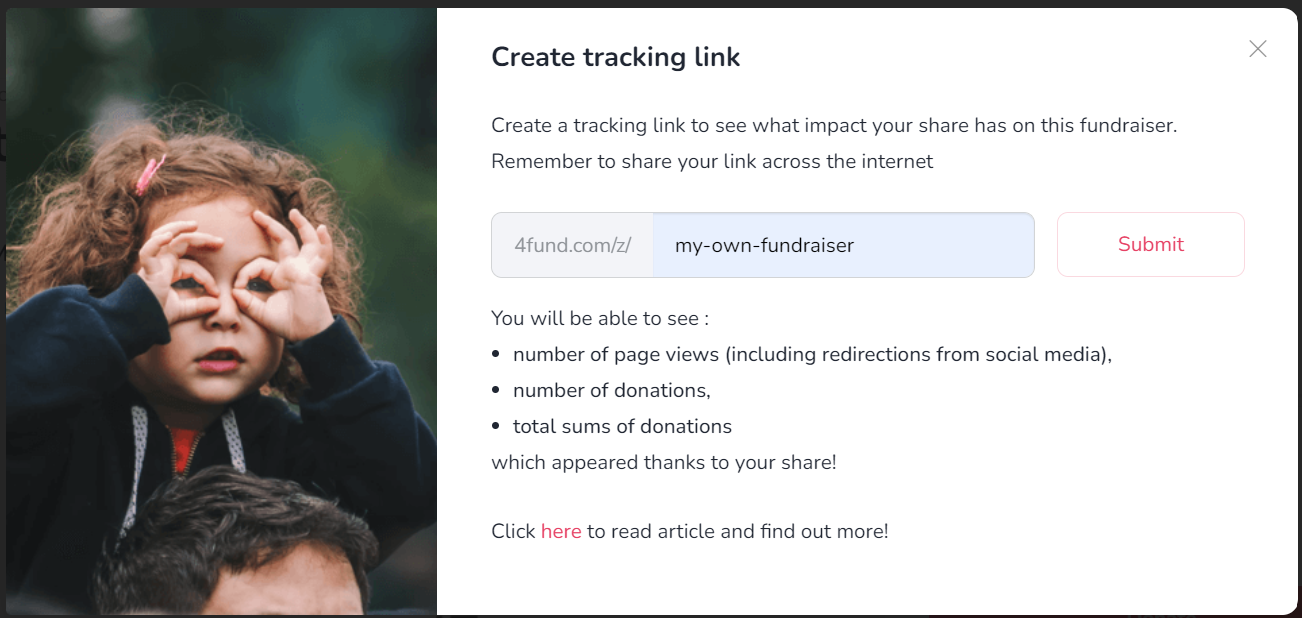
Now click the 'Submit' button:
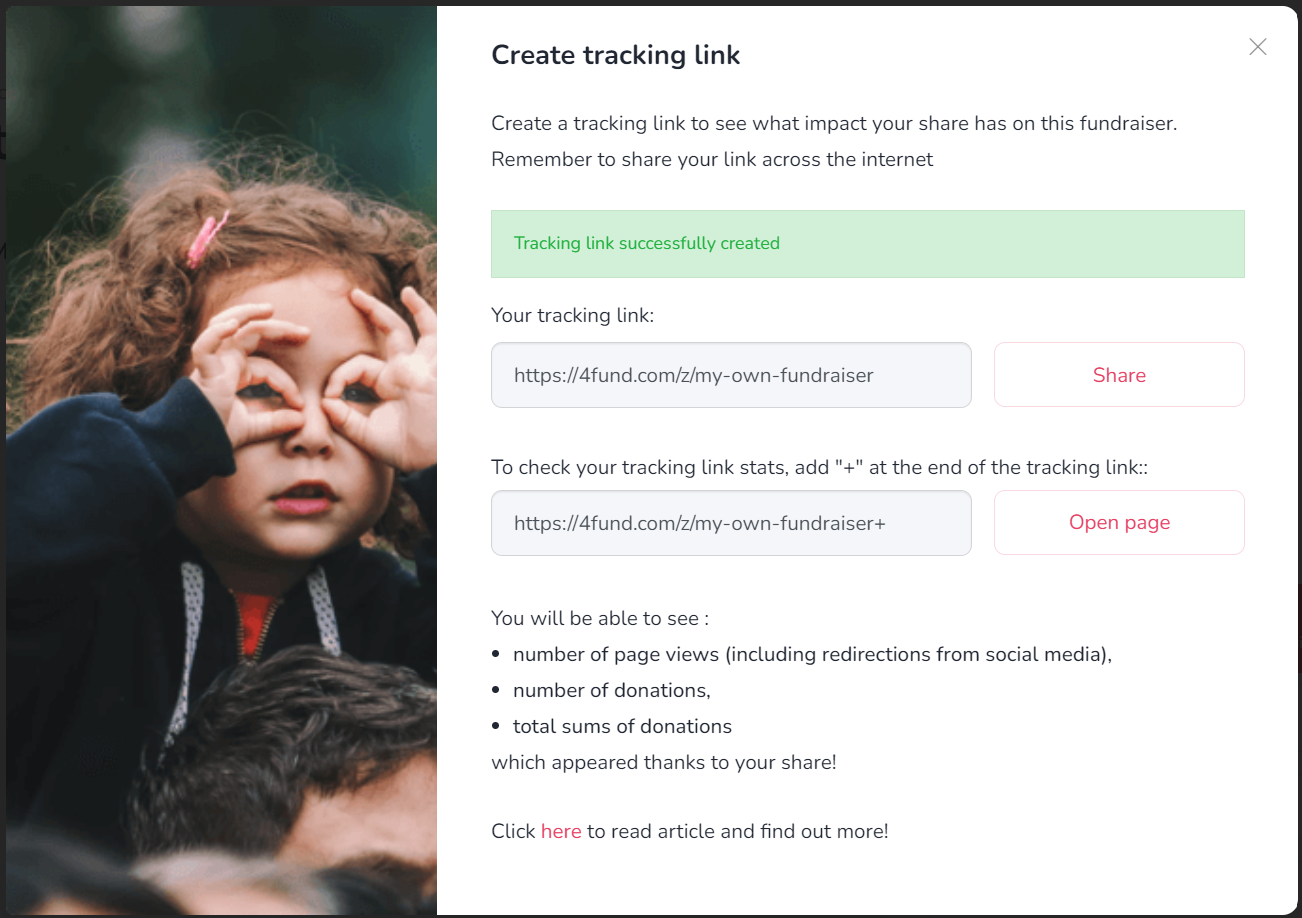
To check how many people clicked on the link and how many donations were made using that link, add the '+' sign at the end (e.g. 4fund.com/z/my_fundraiser+). You can create multiple tracking links for each fundraiser.
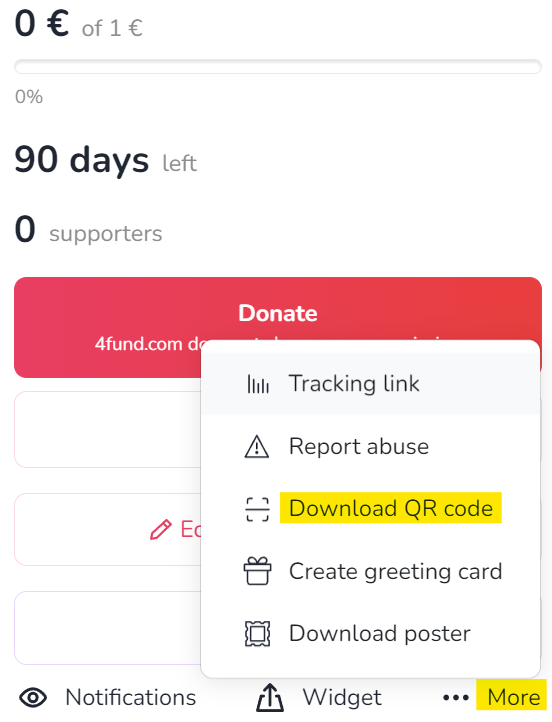
You can generate a QR code for each fundraiser. Just take a photo of it and this will allow you to access its details or to go directly to the payment. You can place the QR code on anything physical: posters, leaflets, presentations, billboards, or by showing your friends on the phone screen. You can forget about dictating the address of your fundraiser - click on the fundraiser page '...More' -> 'Download QR code' and you're done
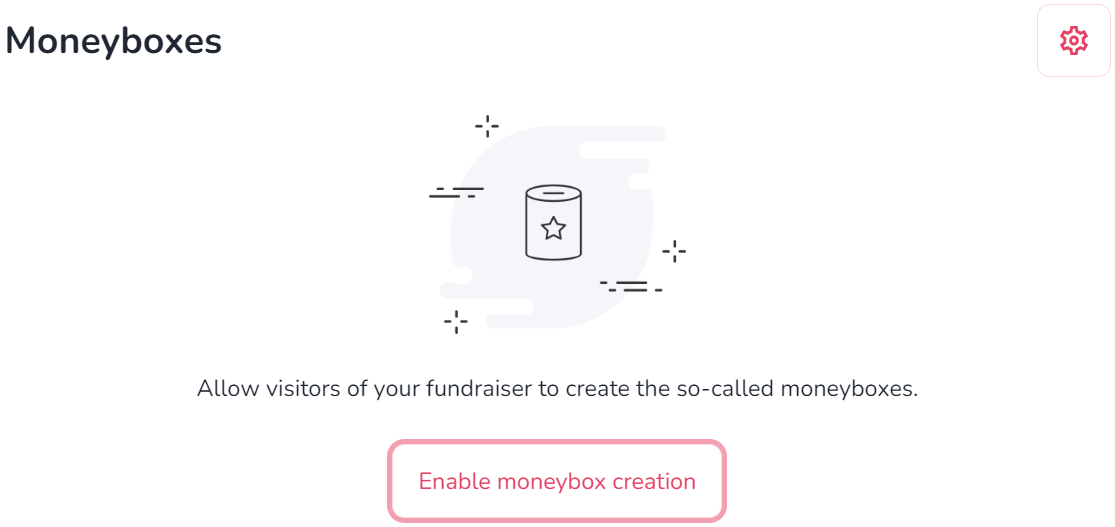
The moneybox on 4fund.com works like an online donation box - employees of a specific company, fans of a particular celebrity, or people gathered in one Facebook group can transfer donations to it and watch how much funds they managed to raise. The person creating the moneybox appears as the Organiser and can edit its description, link, as well as thanks for the payment. All the funds raised in the moneybox are credited to the balance of the main fundraiser. An important detail is when you create a moneybox for someone else's fundraiser, you don't have to verify your account!
The moneybox section is located in the fundraiser view under the rewards posts. To allow users to create moneyboxes for your fundraiser, click 'Enable the ability to create moneyboxes'. You can also create a moneybox yourself by clicking 'Add moneybox'.
If you want to show gratitude for a donation you have received, you can create your own personalised ‘thank you’ for the donation and set its content in the fundraiser 'Edit basic information' section. Posting updates is also a great way to keep your Donators in the loop and connected.
Creating a fundraiser is a very simple operation. A basic fundraiser can be created in less than 30 seconds! However, for professional and more demanding users, we have prepared a few interesting solutions, like tracking link, moneyboxes, rewards, widgets, QR codes and much more. All advanced functionalities of 4fund.com have been collected for you in this blog article. Enjoy reading!
End of fundraiser
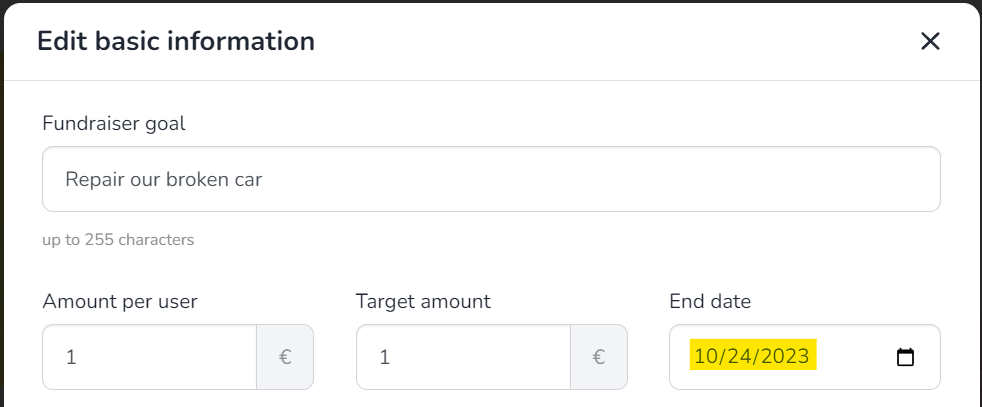
You can change the end date of your fundraiser at any time. To extend the duration of your fundraiser, just click the 'Edit basic information' button on your fundraiser page - just enter a new end date in the 'End date' field and click 'Save'.
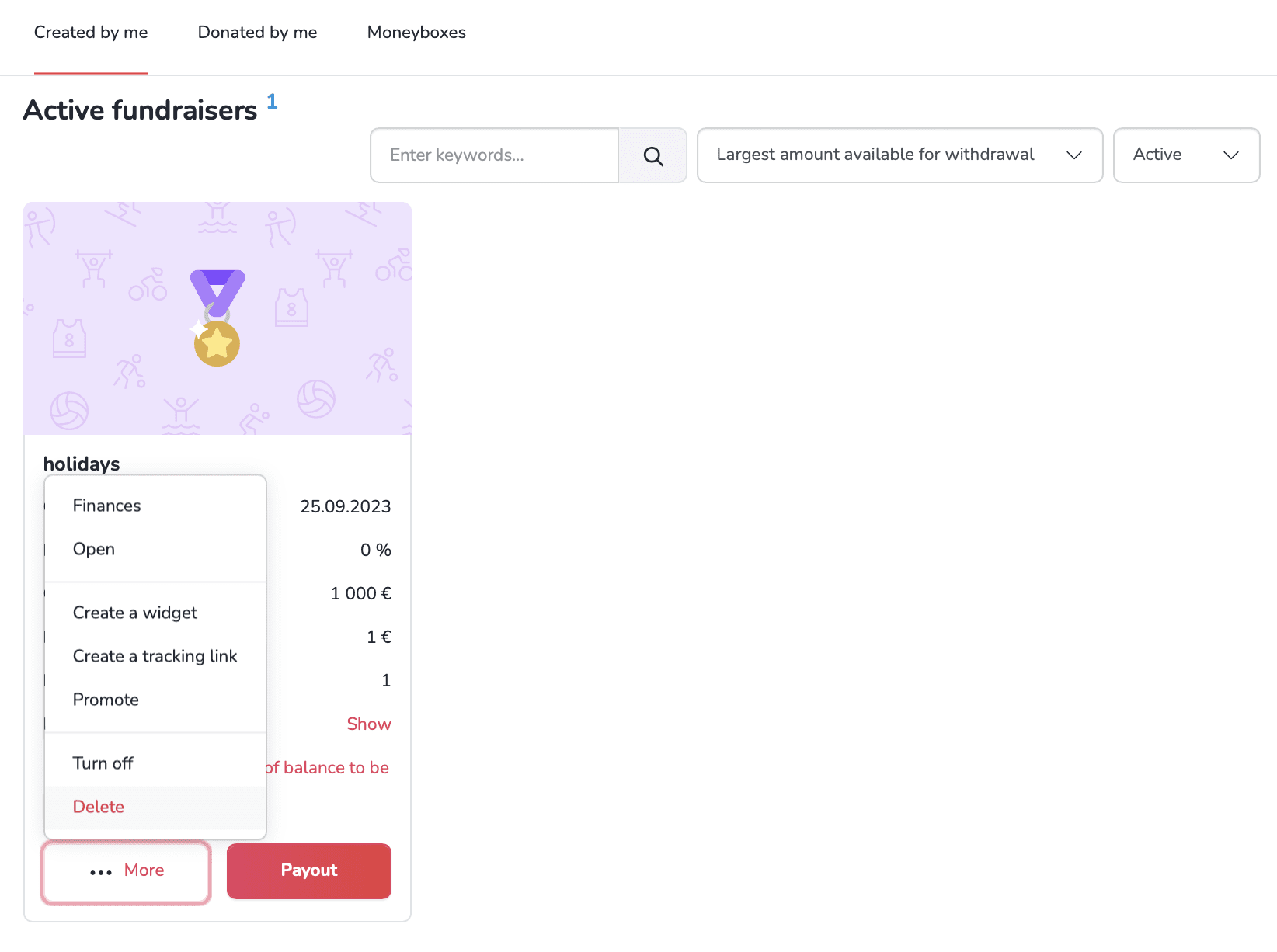
If you want to delete your fundraiser, posting a final update is a great way to let your Donators know that you're closing the page. Then after that you can disable or completely delete your fundraiser at any moment in the 'My fundraisers' tab. Just press the 'More' button, visible in the bottom left corner of the preview of your fundraiser. Select 'Turn off' or 'Delete' from the drop-down menu.
Please keep in mind:
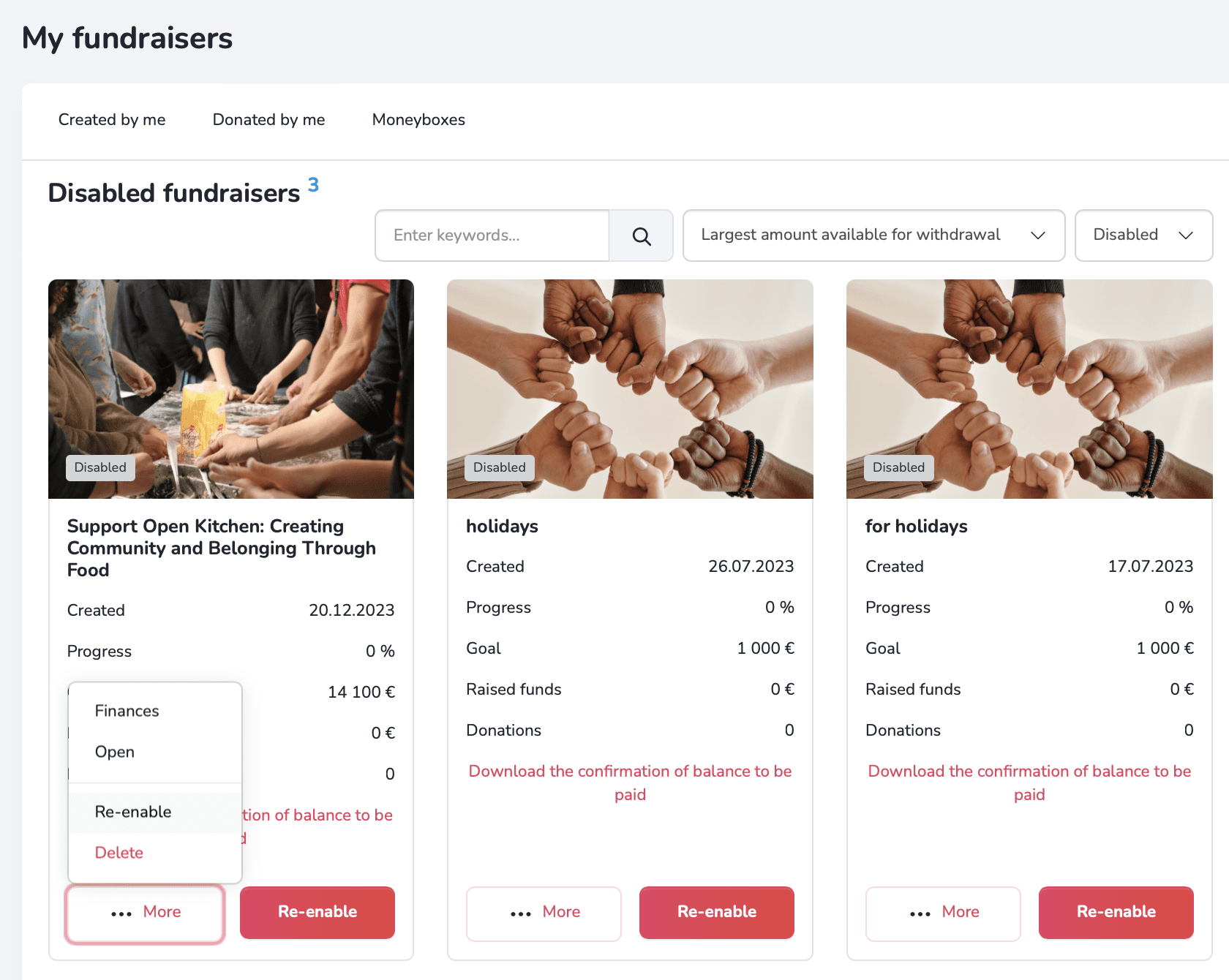
A disabled fundraiser remains visible to visitors, but donations will no longer be possible. A disabled fundraiser can be re-enabled at any time. On the other hand deleting the fundraiser will prevent the visitor from seeing its content. A deleted fundraiser cannot be re-enabled.
In order to re-enable the fundraiser, go to the 'My fundraisers' tab and set the 'Disabled' filter - then select the 'Enable' option from the drop-down menu in the fundraiser preview.
General
At 4fund.com, we care deeply about the security of both our organisers and donors. To build a trustworthy crowdfunding community, we make sure that everyone on our platform can feel safe.
As a licensed Payment Services Provider we are legally obliged to follow strict European Anti-Money Laundering (AML) and Counter-Terrorist Financing (CTF) regulations. Consequently, we must establish and confirm the identity of our users. This helps us protect our community from fraud. In addition, in certain cases, we also verify the credibility of the fundraiser’s description itself.
Please note that verification of identity is mandatory only for fundraiser organisers. If you are a donor, you do not need to go through an identity verification process.
Yes, absolutely. We take data privacy and security extremely seriously. As a licensed Payment Services Provider, we operate under strict financial regulations to ensure the highest standards of safety. Your sensitive information is stored safely and used strictly for identity verification purposes in compliance with GDPR regulations.
Below you will find documents - templates of powers of attorney and consents that may be useful during the profile and fundraiser verification process:
- Consent to run the fundraiser on my behalf and to process my medical records (download)
- Consent to process my medical records (download)
- Consent to run the fundraiser on the behalf of the person under my care and to process their health records (download)
- Consent to run a fundraiser on my behalf (download)
- Consent to run a fundraiser on the behalf of a person under my care (download)
- Consent to run a fundraiser on behalf of an institution in which I am employed/which I manage (download)
- Declaration of PEP status (download)
- Declaration of sources of assets - PEP (download)
Profile verification
Profile verification consists of two main parts: completing the identification form and submitting your verification documents. To start the process, follow these steps:
- Log in to your user profile.
- Click on your profile icon in the top right corner and select 'Account verification' from the drop-down menu.
- Fill in the identification form with your accurate personal details (name, personal identification number, address, and identity document information).
Note: Make sure all data is correct, as you will not be able to edit it after saving the form. - Complete the PEP (Politically Exposed Persons) statement regarding whether you hold a prominent public position.
- Review the summary of your information carefully and click 'Next Step' to save.
Once saved, your fundraiser will be active for 30 days, during which you must complete the document verification to enable withdrawals and keep your campaign running.
To finish the process, use our automated verification tool, Onfido, to submit a photo of your identity document and a video of your face. If all data matches, your profile will be automatically verified within a few minutes, and a verification icon will appear on your account.
Filling out the identification form takes just a few minutes. If all the information provided in your form matches your identity document and facial video, your account will be automatically verified almost immediately.
During the profile verification process, you will be asked to send a photo of your identity document: identity card (both sides), passport (photo side) and residence card (both sides). The details and photo on the document must exactly match your registration details and the image from the short video taken during the biometric verification process.
No, to activate donations you need to complete the identification form. As soon as you fill it out, your fundraiser goes live for 30 days, allowing people to freely make contributions. During this period, you must successfully complete the remaining part of the verification process (including submitting your ID and a facial scan) to be able to withdraw the raised funds.
Yes. As a licensed Payment Services Provider, we are legally required to confirm the identity of our users to ensure the highest standards of financial security and compliance. This process (biometric verification) ensures that the person creating the profile is the actual legal owner of the identity document.
No. To successfully complete the security check, the photos of your identity document must be completely clear, of good quality, and show all four edges of the document without any information being cut off, covered, or blurred. The details on the document must fully match the information you entered in the registration form and the image from your facial verification video.
If your automated verification was unsuccessful, it is usually due to one of the following common reasons:
- Data mismatch – the personal details entered in your identification form do not exactly match the information on your identity document.
Note: Please check your inbox (including your spam folder) as our system automatically sends an email notification in this case. You may simply need to review and confirm your data via the link provided. - Document issues – your identity card or passport has expired, or the document type is not supported by our system.
- Poor photo or video quality – the photos of your ID were blurry, reflective, had information covered, or the edges of the document were cut off. Alternatively, your facial verification video may have been unclear or taken in poor lighting.
If your verification is rejected, please contact us, and we will check your application and assist you in completing the process successfully.
PEP stands for Politically Exposed Persons. As a national payment institution, we are legally obliged to identify whether our users hold prominent public functions (such as a minister, president, or senator). This is a standard regulatory requirement for financial platforms, which is why the PEP declaration is included in your account setup form.
If you have filled out the PEP form incorrectly by mistake, please contact us. Our team will unlock the form for you so you can correct your answer and proceed with your verification.
Organisation verification
After you register, you must verify your account as a private individual first. Only once you have successfully completed this initial personal verification will you be able to submit the details for your company or organisation account.
Once you have passed your personal profile verification, you can proceed to fill in the form for your company or organization.
Our customer support team will carefully review your application and reach out to you via email. We will guide you step by step through the process of setting up your institutional profile, including providing detailed information about any verification documents required for your specific organisation type.
Check out our blog post for a more detailed step-by-step guide on institutional verification.
Unlike private profiles, institutional accounts are reviewed manually by our team to ensure the highest safety standards. If all submitted documents are correct and compliant, your organisation account will be verified within two working days.
Fundraiser description verification
As a licensed Payment Services Provider, we operate under strict financial regulations to ensure the highest level of safety and security for both organisers and donors. In order to protect our community against fraud, we are legally required to verify the description and purpose of a campaign in the following four specific situations:
- When you want to launch an official fundraiser promotion.
- When the balance of a single fundraiser exceeds EUR 5,000.
- When you collect a total of more than EUR 12,500 across all fundraisers on your account.
- When we receive a report of abuse or have doubts regarding the reliability of a specific campaign, regardless of the amount raised.
You can easily submit the required documentation through your account dashboard using one of two methods:
- Go to your profile settings and select the 'Verify a fundraiser' tab
- Or verify directly from the editing view of your chosen fundraiser. Log in, scroll to the very bottom of the fundraiser page, and upload the necessary files in the designated field.
The documents you need to upload depend entirely on the purpose of your fundraiser. You should provide official evidence that confirms how the raised funds will be spent. This may include:
- Medical records, invoices, or cost estimates (for medical fundraisers).
- Invoices, receipts, or agreements with suppliers (for project or business fundraisers).
- Written consents or powers of attorney if you are collecting funds on behalf of someone else or an institution.
For more information, check out our blog post.
Note: If you need official templates for consents or declarations, you can find them in the 'Document templates' section.
When verifying the description or goal of your fundraiser, our team must manually check the attached documentation. We always try to speed up the process as much as possible, but please bear in mind that checking these documents can take up to two working days, depending on the complexity of your fundraiser and the information provided.
Note: We may contact you if we require additional information or clarification regarding your submitted documents. In such cases, the fundraiser description verification process may take longer.
General
It's completely free! Creating and running a fundraiser, as well as making donations, is 100% free for both organisers and donors. We do not charge any mandatory commissions on donations or withdrawals, meaning the full amount goes directly to the fundraiser.
To keep our platform free, both donors and organisers can support us with a voluntary tip during the donation or withdrawal process, but it is never required.
General
Creating a profile takes just a few seconds. You can register a new account directly by filling out the form on our homepage. Simply enter your email address, set a secure password, and follow the on-screen instructions to get started.
To set up an account for a foundation, association, or business, complete the brief application form. Our customer support team will then (if we accept your request) reach out to you via email and assist you step by step to go through a manual company onboarding process.
Donations
To donate funds to a fundraiser, just click the ‘Donate’ button on the selected fundraiser’s page. Choose the amount you wish to give, select your preferred payment method, and complete the basic information in the payment form to finalize your transaction. Your donation will be processed immediately, ensuring that the funds reach the fundraiser quickly and securely.
To make a donation, you can select from our available secure payment methods: Visa, Mastercard, Apple Pay, Google Pay, Revolut, ZEN, iDeal, Bancontact, Multibanco, MB WAY, N26, Skrill and EPS.
You can support your favourite causes with automatic monthly payments if the fundraiser organiser has enabled this option. To set up a recurring donation:
- Click 'Donate your way' on the fundraiser page.
- Specify your monthly support amount.
- Select the recurring payment option during the checkout process.
Please note that to set up, manage, or cancel your recurring donations, you must be logged into your 4fund.com account.
Yes, you can support fundraisers using your preferred local currency. When making a donation, simply select your currency of choice from the list (such as GBP, USD, PLN, CHF, and many others). Since all fundraisers on 4fund.com are officially run in euros (EUR), your donation will be automatically converted to EUR during the secure payment process.
No. To ensure that our platform remains 100% free of charge for everyone, we are unable to offer PayPal as a payment method. However, we provide a wide range of other secure and convenient payment options.
Of course! Donations from abroad can be made regardless of the local currency, from anywhere in the world – your donation will be automatically converted by the bank and will reach the fundraiser in euros.
If you don’t want your name to be visible on the fundraiser page, you can check the box 'Hide my details in the public list of donations on this fundraiser' during the payment process. You can also choose 'Hide the donation amount in the public list of donations on this fundraiser' if you wish to hide only the specific value of your contribution.
Online payments are processed and credited to the fundraiser almost immediately, typically taking up to 5 minutes.
You will always receive a payment confirmation via the email address provided during the donation process. Additionally, you can find your payment listed under the ‘Donors' tab visible on the fundraiser page (unless the organiser has chosen to hide donor data).
You can also download an official PDF confirmation directly from your profile:
- Log in to your user profile.
- Go to 'My fundraisers' → 'Donated by me'.
- Open the preview of the specific fundraiser and select 'Donations' → 'Donation details' → 'Download confirmation PDF'.
If you have donated to a fundraiser, it may not be possible to receive a refund, as we transfer the funds raised to the page owner directly. However, you can contact the Organiser of the fundraiser with a request for a refund, using the 'Ask the Organiser a question' button.
If you supported 4fund.com with an optional tip by mistake, please contact us to request a refund.
To make a refund to donors, follow these steps:
- Go to the 'My fundraisers' tab and click the 'More' button on the selected fundraiser.
- Select 'Finances' from the drop-down menu.
- Choose the specific payments from the list that you want to return to donors.
- Press the 'Return selected' button at the bottom.
- Decide who will bear the return costs (€0.5 for each transfer) – the organiser or the donor.
Account management
If you are having trouble signing in or simply cannot remember your password, click the 'I forgot my password' button in the login window. After that, you will receive an e-mail with an active link to create a new password.
To change your e-mail address, please contact us, and we will guide you step-by-step through the e-mail address change procedure.
Adhering to our regulations, it is not possible to change the organiser to another person or organisation. Nor is it possible to change the organiser's core data – the details must remain consistent with the registration form, payment card, and identity document. However, in exceptional cases (such as a legal change of surname), it is possible to correct the profile data. In this case, please contact us for assistance.
To delete a profile, follow these steps:
- Go to the 'Settings' tab.
- Choose the 'Profile settings' option. Go to the bottom and click the ‘Delete account’ button.
Please note: To delete your account, your balance must be zero. If you have any funds left on your fundraisers, you must withdraw them or return them to the donors first.
Reccuring fundraisers
A recurring fundraiser, in addition to a single donation, allows regular monthly donate for the Organiser. The Organiser of such a fundraiser has the chance to create a steady, recurring source of income, and Donators can receive regular rewards for their donations, i.e. access to the author's content.
At 4fund.com, neither you nor your Donators need to have a PayPal account. You can donate to the fundraiser by card and the most popular online methods. All this for free and without commission! 100% of the funds raised will be paid out whenever you want.
Try it now on https://4fund.com/recurring!
The recurring fundraiser differs slightly in appearance from the regular fundraiser - the amount of funds raised is illustrated in the form of a progress wheel, and the amounts are given in two versions - total and monthly.
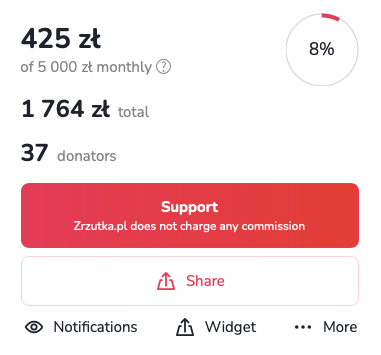
Recurring fundraisers are most often used by online creators, i.e. youtubers, bloggers, streamers, musicians, podcasters or photographers. Donators pay monthly sums into the account of the Organisers, who get the opportunity to develop their passions and talents, and Donators get great rewards and satisfaction from donating interesting projects! You use the recurring fundraiser for free - we do not charge any fees or commissions.
The recurring fundraiser is therefore a solution for anyone who has something to offer their audience - in a subscription model, of course. It is also a place for Donators who, by donating to interesting projects, can receive unique rewards!
Creating a recurring fundraiser is as simple as creating a regular one. You can do this by entering the goal of your new fundraiser in the form at https://4fund.com/recurring. Once you have created your fundraiser, don't forget to create an interesting description and add images. You can also offer unique rewards to Donators.
Profile settings
To update your basic personal information, go to 'Settings' and select the 'Edit details' tab. From there, you can upload or change your profile picture, add a short bio and insert a link to your website.
Your phone number may be useful for account communications and security verifications. To add or change your number:
- Go to your 'Settings' dashboard and select the 'Phone number' tab from the left-hand menu.
- Choose your country prefix code from the drop-down list (e.g. PL +48).
- Enter your current mobile number in the 'Phone number' field and save your changes.
You can completely customise what information other users can see on your public profile page. To adjust these privacy settings:
- Go to 'Settings' and select the 'Profile settings' tab.
- Under the 'Show in my public profile' section you can choose to show or hide your e-mail, phone number, registration date, fundraisers (private, promoted, donated, or organised on behalf of an organisation), profile photo, and total amount raised.
To control how you receive security codes for sensitive actions on your account, follow these steps:
- Select the 'Limits and authentications' tab from the side menu.
- Under 'Authentication method', choose whether you want to receive your 6-digit security codes via 'SMS message' or 'Email message'.
- Save your changes to complete the setup.
If you are waiting for your authentication code and it has not arrived yet, there are some things you can do:
- Check your spam folder – if you find a message with a code in the SPAM folder, mark it as a safe message so that the problem does not arise again in the future.
- Check your mailbox storage – make sure that your mailbox is not full and can receive new messages.
- Wait a brief moment – although rare, temporary network delays can sometimes occur.
- Request a new code – if you have waited more than 5 minutes, request a new code.
- Switch your authorisation method – consider switching your settings from email to SMS (or vice versa) to receive your codes via an alternative channel.
Authentication codes are generated automatically and are only valid for 5 minutes. If this time has expired, you must repeat the action on our website to generate a new code.
Note: Requesting a new code automatically deactivates all previous ones. If you have made multiple attempts, make sure you enter the code from the very last message you received.
Reccuring payments
A recurring donation works in a similar way to a standing order at your bank. By selecting the recurring donation option, you set an amount that will be automatically debited from your card each month and transferred to the account of the selected fundraiser.
As a logged-in user, you can transfer such fixed donation to those fundraisers that are recurring. You can deactivate automatic donations at any time in the settings in your user profile.
If there is not enough funds in your account on the payment date, the system will make a repeated attempt to transfer funds for 3 consecutive days. If there is not a sufficient funds in your account within this time, the system will not attempt to make the donation again until the following month.
If you no longer wish to donate a particular fundraiser, the option to cancel donate can be found in your account settings ('Settings' tab → 'Recurring donations' tab → 'More' → 'Disable')
Withdrawals
To withdraw your funds:
- Go to the 'Withdraw funds' tab in your profile.
- Select the fundraiser you want to withdraw money from.
- Click the 'Pay out' button.
- Enter the desired amount and fill in the withdrawal details.
- Finally, confirm the transaction using the authentication code sent to your email address or phone number.
Please note that to withdraw funds, you must first complete your payment card details for withdrawals. If you experience any issues, please contact us, and we will guide you on how to withdraw funds via a traditional bank transfer to your account.
Yes, absolutely! On 4fund.com, you keep everything you collect, and you can withdraw your available balance at any time – even if your target goal has not yet been fully reached.
You can withdraw funds at any time, even if your fundraising goal has not yet been reached.
Withdrawn funds will be credited to your payment card almost immediately after requesting the payout through your profile (usually within a few minutes) thanks to VISA Direct and Mastercard Send solutions.
Please note that this process may take a few business days if you requested a withdrawal to your bank account.
No. Payout details are strictly confidential and visible only to you. The withdrawn amount will disappear from the balance available for withdrawal inside your private 4fund.com account dashboard, but the total amount visible on your public fundraiser’s page won’t change.
For safety reasons and in compliance with financial service regulations, we may temporarily apply a withdrawal lock to verify your fundraiser’s reliability. If withdrawals from your fundraiser have been locked, we will immediately inform you via email detailing exactly what steps or documents are needed to unlock your account. Please make sure to check your inbox carefully, including your SPAM folder.
If your payouts are blocked and you haven't received an email from us, please contact us.
To adjust your transaction thresholds and set up payout notifications, follow these steps:
- Go to 'Settings' and select the 'Limits and authentications' tab from the side menu.
- Under 'Limits and SMS notifications', you can adjust your 'Daily payout limit' using the drop-down menu.
Notifications
You can receive updates about new donations, comments, and news directly to your email address. To enable or disable these notifications at any time:
- Go to the specific fundraiser page.
- Click the 'Observe' button.
- Tick or untick the boxes for the updates you wish to receive or stop receiving.
To sign up for our newsletter and receive the latest articles, useful tips and summaries of the most interesting fundraisers, click here and leave us your e-mail address.
If you want to stop receiving our newsletter, follow these steps:
- Go to the 'Settings' dashboard.
- Select the 'Profile settings' tab.
- Scroll down to the 'Other' section.
- Untick the checkbox: 'I want to receive occasional emails about the most interesting events and campaigns on 4fund.com'.
You can also just click the 'Unsubscribe' link located in the footer of any newsletter you receive from us.
Support tiers
Support tiers are a feature available in recurring fundraisers. They allow organisers to create different levels of monthly support (like €5, €20 or €50) and offer specific benefits to supporters in return, such as:
- exclusive posts,
- early access to content,
- behind-the-scenes updates,
- access to private groups,
- special acknowledgements or perks.
Watch a short video to find out how the support tiers work:
Posts in support tiers are exclusive pieces of content available only to supporters who contribute at a specific tier level (or higher). They allow organisers to share updates, behind-the-scenes content or rewards with their recurring supporters.
A post can include:
- text,
- links,
- images,
- videos
- and other materials.
Adding support tiers is very simple:
- Go to your recurring fundraiser (you can find it on the “My fundraisers” page).
- Click the “Add support tier” button below the section showing the total amount raised, the number of donors and the monthly contributions.
- Enter the support tier details, such as the title, contribution amount and description.
- Once everything is ready, click the “Save” button. Your support tier will then be visible on your fundraising page.
You can find a detailed step-by-step guide on our blog.
- After creating a support tier, click the “Manage” button next to the selected tier. Then choose “Add post.”
- Fill in the post details, such as the title, description and cover image.
- Select who can see the post – “For any tier” or “For this tier or higher”
- Click “Save” to publish the post.
From that moment, the content will be visible only to eligible supporters.
Thanks to support tiers, supporters can enjoy a membership-like experience, feel appreciated and become more connected to the project.
For organisers, support tiers can provide stable, predictable monthly income, encourage long-term support, increase engagement and build a stronger community.
Support tiers are available for anyone running a recurring fundraiser on 4fund.com – including creators, influencers, non-profit organisations and individuals looking for regular monthly support.
Taxes & Invoices
To receive invoices for purchased premium features, use the following steps:
- Log in to your user profile.
- Go to the 'Settings' tab and select 'Invoices'.
- Check the 'I want to receive invoices' checkbox.
Please note that it is not possible to get an invoice for services purchased before checking the checkbox. We also do not issue invoices for donations.
We do not provide tax advice. If you want to know more, check with a tax professional to be sure or contact your country’s tax office.
Other
All official emails from 4fund.com are sent exclusively from @4fund.com and @mail4fund.com domains. If you receive a message claiming to be from 4fund.com from a different domain, do not click any links and report it to us at [email protected]. To make sure our emails reach your inbox, we recommend adding these domains to your trusted senders list.
There are some activities that are prohibited on 4fund.com:
- You may not raise funds for any goal that would be illegal in your country or in Poland (the country of our registered office). Polish law does not prohibit most fundraiser's goals, but with one notable exception - you may not raise funds to cover fines or bail imposed in the criminal proceedings.
- The goal or the description of your fundraiser may not endorse, support or promote hatred, violence, discrimination, terrorism, fascism or other totalitarian regimes, or publicly condone crimes.
- You may not harm, slander or defame anyone through your fundraiser. This applies both to your fundraiser’s goal and its description. You may raise funds to finance legal proceedings against someone (e.g. to pay lawyers fees), but if you indicate any circumstances that may defame someone in the description of your fundraiser, and that someone raises objections to us, you will have to prove that what you write is true with an appropriate official document (e.g. a relevant court judgment). Remember that 4fund.com is neither a court of law nor a place of dispute resolution.
- You may not raise funds to buy weapons (regardless of legality of such purchase).
- You may not raise funds to finance gambling, prostitution or pornography (regardless of legality of such activities).
- You may not use 4fund.com to finance or spread misinformation or fake news. If we find what you write in your fundraiser’s description doubtful, we will need you to prove it. Keep your fundraiser’s description true and verifiable.
- You may not offer shares in companies for donating to your fundraiser or construct a fundraiser where the donations would be treated as loans to you from your Donators. This is because we are a donation-based crowdfunding site, not an equity crowdfunding one - if your business plan includes such a solution, we suggest you use a specialized site.
Yes. As a Licensed Payment Services Provider we are obliged to ensure the highest safety standards for your payments and data.
Find out more at the 'Safety & security' tab.
At 4fund.com, we follow a number of requirements and procedures to ensure that your data and your funds are safe. We have also prepared a list of the most important rules for using our fundraising platform safely.
Read this article on our blog to learn how to avoid online scams and keep your money safe.
4fund.com is licensed to provide payment services in the European Economic Area and, under this licence, is obliged to verify the identity of its customers. It is run by the Polish company zrzutka.pl which is the leading crowdfunding site in Poland.
There are two verification processes.
- Profile verification
- Fundraiser cause verification
We also use a global entity verification and background check company called Onfido. Their technology allows us to verify our users to the highest extent.
We also use a variety of methods to verify Organisers and ensure the legitimacy of fundraising campaigns. These include:
- Identity verification
- Biometric verification
- Review process
Thanks to these procedures, we know exactly who is raising funds on 4fund.com and we can take care of the right level of security.
For more information of verification process on 4fund.com, please visit our blog.
In order to keep your data as secure as possible, you can additionally make sure, that nobody is looking above your shoulder!
We verify the identity of all Organisers. In addition, in situations defined by our regulations (for example, when we exceed certain fundraising thresholds or when we receive applications for a particular fundraiser), we also verify the truthfulness of the goal stated in the description of the fundraiser, asking the Organiser to send us relevant documents to confirm it. In case we have doubts whether the funds from an ongoing or already completed fundraiser have been used in accordance with the Organiser's declarations, we can also check their spending by asking, for example, for transfer receipts, invoices or receipts.
If you have any doubts or concerns about a particular fundraiser, please contact the Organiser to confirm its reliability. You can also report abuse to the fundraiser, which will be analysed by our staff.
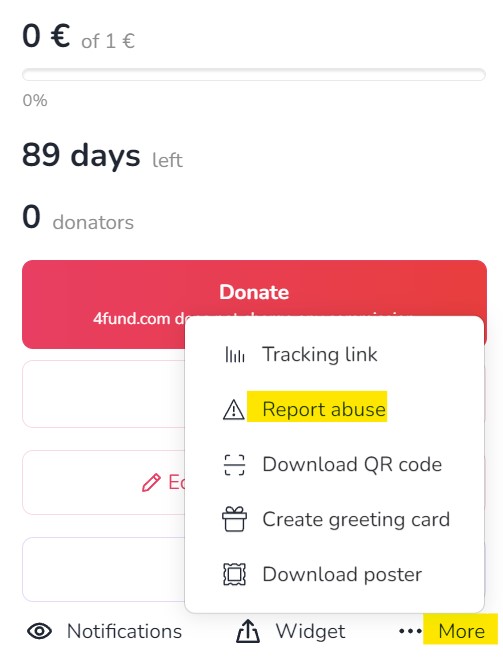
If you are concerned about the legitimacy of a fundraiser on our site, be sure to report it to us using the 'Report abuse' button. All such reports are analysed by our team. We are pleased that our users remain vigilant, as this enables us to detect any potential abuse more quickly and efficiently. Only fundraisers that violate our terms of use will be removed.
The user can, at any time, block the installation of cookies, delete permanent cookies or otherwise modify the conditions for storing or receiving cookies by using the appropriate options of their Internet browser, i.e. Microsoft Edge, Mozilla Firefox, Google Chrome, Opera, Safari.
In each Organiser's profile on 4fund.com, just below the title and Organiser's name, you'll find information on how the profile has been verified.
Additionally, in the case of charitable fundraisers (for medical treatment, the aftermath of fires or animal treatment etc.) the fundraiser may additionally have a credibility icon. This means that the Organiser has sent us additional documents confirming the truthfulness of the description of the specific fundraiser.
Other
Our public API is available at https://4fund.com/api/v1/public/doc. If you wish to receive access, please send a request via the form in the contact section.
After reviewing your application and the planned use of the API, the service will assign a dedicated 'access_token'.
If you have any suggestions/new endpoints, please let us know. At the same time, we warn you that endpoints supporting key functions such as:
- login/registration/reset user password
- payment
- withdrawal of funds
- user verification
- premium purchase
- checking the payout balance
are not publicly available and may only be made available to those that offer various services based on access to bank accounts, e.g. data aggregation or personal finance management. Among them, there may be only banks, payment institutions or other providers that have an appropriate license for this type of service (due to the regulations contained in the Payment Services Directive 2 - an EU directive that introduces a single payment market in EU countries).
Other
To verify a corporate account, please follow the detailed steps outlined in our blog post. This guide will walk you through the entire process step by step.
You can read the full instructions here.
If you have any questions or need further assistance, feel free to contact our support team.
Fundraising for a nonprofit organisations has never been easier! Create a fundraiser on behalf of the organisation you care about most. Support their cause and make a difference now! Check out the blog article.
Or perhaps you run a nonprofit organisation? Would you like other users to help you achieve its goals? Give them the opportunity to create fundraisers on behalf of your organisation! Read our guide for NGOs and follow three simple steps to be listed in our NGO catalogue as a fixed beneficiary!
For fundraisers organised on behalf of an organisation, the organiser sets up and manages the fundraiser, but the donated funds go directly to the beneficiary organisation. In this type of fundraiser, you can find the name and logo of the organisation just below the fundraiser's cover photo.

On 4fund.com you can easily, quickly and safely create a fundraiser on behalf of an NGO you care about. All you have to do is go to https://4fund.com/patronized-fundraising, fill in a short form and choose an organisation from the catalogue. Wait for the selected NGO to approve your fundraiser. And that’s it!
After the organisation approves your fundraiser, you can start raising funds! You don't have to worry about billing - all collected funds will go directly to the charity organisation for which you've created a fundraiser.
Become a Fixed Beneficiary is all you need to allow others to create fundraisers on behalf of your organisation. The first step is to have a fully verified profile for your foundation or organisation. If you haven't done this yet, you can register your organisation. Once your account is verified, you will find the 'Become a Fixed Beneficiary' tab in your account settings.
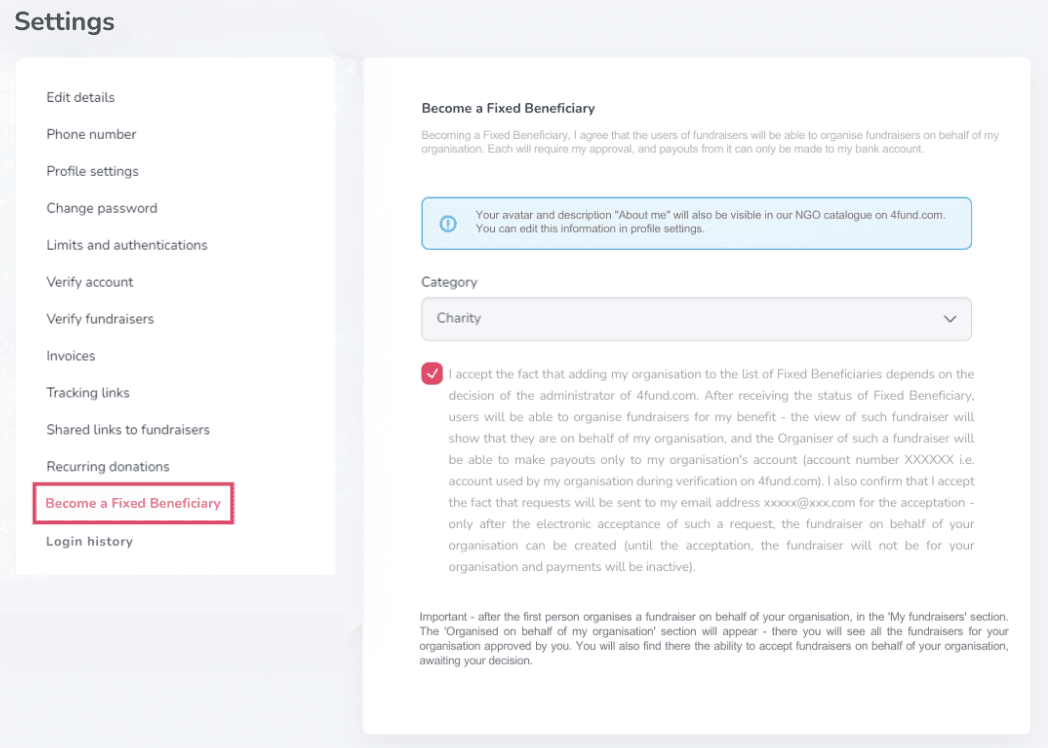
For more information, see our guide on fundraisers for NGOs.
As a Fixed Beneficiary, you will receive a dedicated landing page. Additionally, a box will appear on your profile, allowing anyone to set up a fundraiser on your behalf.
Other
On 4fund.com, "Offers" and "Auctions" are innovative features that allow fundraisers to raise money by selling or auctioning items and services. This approach enables supporters to contribute financially while receiving something in return, enhancing engagement and providing additional fundraising avenues.
Offers
- Buy Now: Supporters can purchase items or services at a fixed price.
- Categories: Offers span various categories, including fashion, books, electronics, crafts, digital downloads, and unique experiences.
- Digital Delivery: For digital products like e-books or vouchers, buyers receive instant access upon payment.
- No Fees: 4fund.com does not charge commissions, ensuring that 100% of the proceeds go directly to the fundraiser.
Auctions
- Bidding: Supporters can bid on items or services, with the highest bidder winning the auction.
- Notifications: Participants receive email alerts if they are outbid or when an auction is nearing its end.
- Transparency: All auctions are managed directly on the platform, eliminating the need for external communication.
- Support for Causes: Funds from auctions go entirely to the associated fundraiser, allowing supporters to contribute meaningfully.
Adding offers or auctions to a fundraiser on 4fund.com is a straightforward process that enhances fundraising efforts by providing supporters with tangible incentives. Here's how you can add offers or auctions as an organizer:
1. Log In and Access Your Fundraiser:
- Sign in to your 4fund.com account.
- Navigate to your fundraiser page.
2. Add an Offer or Auction:
- Scroll to the "Offers/Auctions" section.
- Click the "+" button to open the form for adding a new offer or auction.
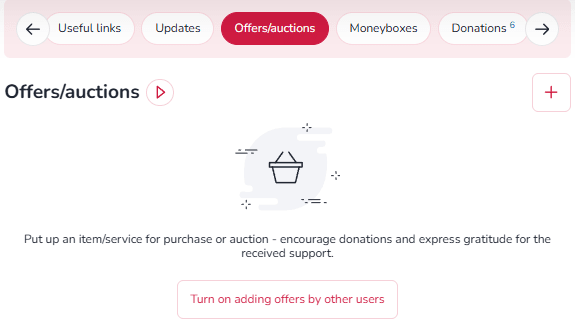
3. Fill in the necessary details:
- Title and Description: Provide a clear and concise title and description of the item or service.
- Category and Condition: Select the appropriate category and specify if the item is new or used.
- Images: Upload images to showcase the offer (optional but recommended).
- Purchase Mode: Choose between "Buy Now" or "Auction."
- Price and Quantity: Set the price and specify the number of items available.
- Delivery Method: Select the delivery option—personal collection, postal dispatch, or email (for digital items).
- Attachments: For digital products, add downloadable files that buyers will receive upon purchase.
- Contact Information: Optionally, provide a phone number for buyer inquiries.
Auctions on 4fund.com provide a dynamic and engaging way to support fundraisers by bidding on unique items or services. All proceeds from these auctions go directly to the associated fundraiser, with no platform fees or commissions involved.
How to Participate in Auctions
- Discovering Auctions
- Fundraiser Pages: Navigate to a specific fundraiser and scroll to the "Offers/Auctions" section beneath the description to view available auctions.
- Auction Catalog: Browse the Offers and Auctions catalog to explore a wide range of items across categories like art, experiences, collectibles, and more.
2. Placing a Bid
- Select an Item: Click on the auction item you're interested in.
- Enter Your Bid: Input your bid amount in the designated field and click the "Bid" button.
- Account Requirement: If you're not logged in, you'll be prompted to sign in or create a free account. Account creation is quick and doesn't require verification to participate in auctions.
3. Notifications and Updates
- Outbid Alerts: Receive email notifications if another user places a higher bid, allowing you to stay competitive.
- Auction Reminders: An email reminder is sent one hour before the auction ends, ensuring you don't miss the opportunity to place a final bid.
4. Winning and Payment
- Winning the Auction: If your bid is the highest when the auction concludes, you'll receive a confirmation email.
- Payment Window: You have 24 hours to complete the payment through the platform.
- Fund Allocation: The full amount of your payment is transferred directly to the fundraiser's account.
5. Item Delivery
- Receiving Your Item: After payment, the seller (either the fundraiser organizer or a verified contributor) will contact you to arrange the delivery of the item or service.
By posts, you can provide people who donated your fundraiser specific information - such as, for example: access codes or links to your content (photos or videos, access to training courses you conduct, passwords to content premium you offer and others). Posts are assigned to offers - to add posts, you must add at least one offer to your fundraiser first.
You can provide your Donators with specific information such as links to content, access codes (photos or videos, access to training courses you conduct, passwords to content premium you offer and others) through posts. You simply add minimum one offer to your fundraiser.
Other
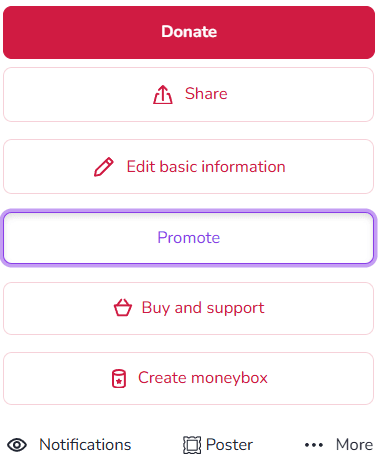
You can buy premium features or you can use the Facebook remarketing advertising option. To see the details of the aforementioned adverts after logging in to your account, go to your fundraiser and select the 'Promote' option.
Our core services are completely free, but as an Organiser you can also purchase various promotion and enhancement options:
- Individual website address (alias)- everyone will easily remember the address of your fundraiser thanks to our friendly link - for example: 4fund.com/your_name.
- Promoted fundraiser [will be available soon]- with this option your fundraiser will be displayed here
- Highlight of promoted fundraiser [will be available soon] - thanks to it, your fundraiser will be displayed in the highest possible position in our catalogue
The cost depends on the length of time for which each premium service is purchased and is available in the 'Promote' tab. You can also buy a package of all three options at an attractive price!
There are several ways to promote your fundraiser:
- Share the link on your social media - Instagram, Facebook etc.
- Email your family and friends and ask them to share the link too.
- Reach out to local media and share your story.
- You can also embed a thumbnail of your snapshot in any external page using the 'Create a widget' option, print a poster or QR code - you will find all these functions by clicking 'More' button on your fundraiser.
Once you have logged into your account, go to your fundraiser and select the 'Promote' option. Remember to make your payment after selecting the additional features you are interested in. You can pay from the balance of the fundraiser or via online payment.
There are several ways to share a fundraiser with your friends. Here are some ideas:
- Share the link: You can share the link of the fundraiser with your friends through social media platforms like Facebook, Twitter, Instagram, or through messaging apps like WhatsApp or Telegram. Just copy the link and share it with your friends.
- Share via email: You can also send an email to your friends with the link of the fundraiser.
- Organise an event: You could organise an event like a fundraiser party or a charity walk and invite your friends to attend.
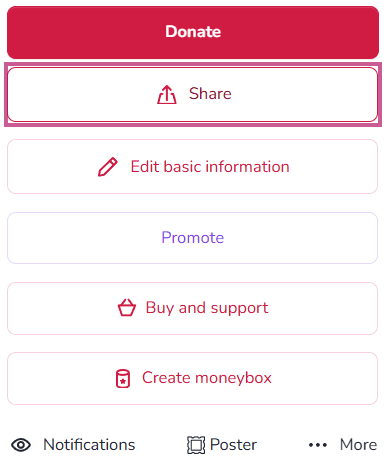
You can share any fundraiser by copying the url or by clicking on the dedicated 'Share' button on the fundraiser page. Your sharing makes a big difference - fundraisers shared on different channels raise as much as 6.5 times more funds on average!
Due to the very large number of requests, in our social media we only promote fundraisers selected by us. We encourage you to take a look at the articles in which we have collected tips to increase the effectiveness of fundraisers:
The promoted fundraiser feature is paid extra and you can purchase it by clicking the 'Promote' button on your fundraiser. The promoted fundraiser will be displayed here, and can also appear among fundraisers advertised on Facebook and Google Ads.
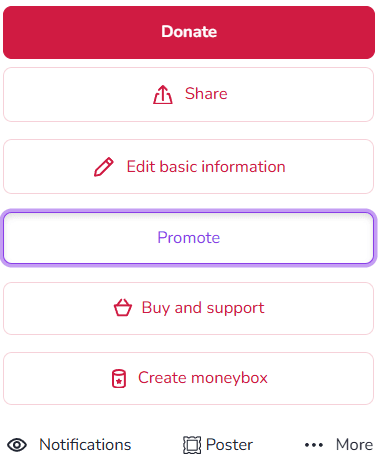
Our core services are completely free, but as an Organiser you can also purchase various promotion and enhancement options.
Are you looking for a fundraiser?
No answer to your question above?
Log in to write to us via the contact form.