Need help?
Most frequently asked questions
4fund.com is an online fundraising platform where people can raise money for the causes and goals that matter to them.
We believe everyone should have the opportunity to ask for support and bring their ideas to life, without worrying about mandatory platform fees or commissions. That's why creating and running a fundraiser on 4fund.com is free.
4fund.com is operated by Zrzutka.pl sp. z o.o., the company behind Poland's leading crowdfunding platform, Zrzutka.pl, with 13 years of experience in online fundraising.
A fundraising campaign can be organised by any European Economic Area resident over the age of 18.
The European Economic Area includes European Union countries (Austria, Belgium, Bulgaria, Croatia, Republic of Cyprus, Czechia, Denmark, Estonia, Finland, France, Germany, Greece, Hungary, Ireland, Italy, Latvia, Lithuania, Luxembourg, Malta, Netherlands, Poland, Portugal, Romania, Slovakia, Slovenia, Spain and Sweden), as well as Iceland, Liechtenstein and Norway.
On 4fund.com, you can raise money for almost anything, as long as your fundraiser complies with applicable laws and our Terms of service.
You can collect funds for medical treatment, rehabilitation, charitable initiatives, business projects, community events or personal goals, such as birthday gifts, dream trips, veterinary care, equipment purchases and much more.
It's completely free! Creating and running a fundraiser, as well as making donations, is 100% free for both organisers and donors. We do not charge any mandatory commissions on donations or withdrawals, meaning the full amount goes directly to the fundraiser.
To keep our platform free, both donors and organisers can support us with a voluntary tip during the donation or withdrawal process, but it is never required.
All official emails from 4fund.com are sent exclusively from @4fund.com and @mail4fund.com domains. If you receive a message claiming to be from 4fund.com from a different domain, do not click any links and report it to us at [email protected]. To make sure our emails reach your inbox, we recommend adding these domains to your trusted senders list.
Yes. As a Licensed Payment Services Provider we are obliged to ensure the highest safety standards for your payments and data.
Find out more at the 'Safety & security' tab.
At 4fund.com, we follow a number of requirements and procedures to ensure that your data and your funds are safe. We have also prepared a list of the most important rules for using our fundraising platform safely.
Read this article on our blog to learn how to avoid online scams and keep your money safe.
General
A fundraising campaign can be organised by any European Economic Area resident over the age of 18.
The European Economic Area includes European Union countries (Austria, Belgium, Bulgaria, Croatia, Republic of Cyprus, Czechia, Denmark, Estonia, Finland, France, Germany, Greece, Hungary, Ireland, Italy, Latvia, Lithuania, Luxembourg, Malta, Netherlands, Poland, Portugal, Romania, Slovakia, Slovenia, Spain and Sweden), as well as Iceland, Liechtenstein and Norway.
On 4fund.com, you can raise money for almost anything, as long as your fundraiser complies with applicable laws and our Terms of service.
You can collect funds for medical treatment, rehabilitation, charitable initiatives, business projects, community events or personal goals, such as birthday gifts, dream trips, veterinary care, equipment purchases and much more.
Setting up a fundraiser
Creating a fundraiser on 4fund.com takes just a few minutes! Select ‘Create fundraiser’ on our homepage or go directly to our fundraiser step-by-step form. Follow the steps to choose your fundraiser type and category, set a target amount, and add a title, description and photos.
For more tips on how to create a successful fundraiser, check out our step-by-step fundraising guide.
On 4fund.com you can choose to create a one-time fundraiser, recurring fundraiser or fundraiser for an organisation.
Yes, you can organise a fundraiser to support someone else. Before starting the fundraiser, you need to obtain the beneficiary's consent. Consent is not required for birthday gift fundraisers.
Choose a clear, high-quality image that shows who or what your fundraiser is about. Authentic photos related to your cause can help build trust and encourage people to donate.
The first image or video in your gallery is used as the fundraiser preview. For images, we recommend a minimum size of 750 × 420 pixels.
Find more tips in our guide to choosing fundraiser images.
A good fundraiser title should be short, clear and specific. It should help people quickly understand who or what you are raising money for. Try to include the main purpose of your fundraiser and avoid titles that are too general.
For more tips, check out our guide to writing a fundraiser title.
Your fundraiser description should explain who or what you are raising money for, why support is needed and how the collected funds will be used. Be specific about your goal and the costs involved. You can also add photos, videos or relevant documents to help donors better understand your situation.
For more tips, check out our guide to writing a fundraiser description.
Editing the fundraiser
To change your fundraising title:
- Select ‘Edit’ on the right side of your fundraiser page.
- Make your changes in the ‘Fundraiser goal’ field.
- Select ‘Save’.
To change your fundraising target:
- Select ‘Edit’ on the right side of your fundraiser page.
- Update the fundraising target in the ‘Target amount’ field.
- Select ‘Save’.
To edit your current fundraiser category:
- Select ‘Edit’ on the right side of your fundraiser page.
- Choose a new category in the ‘Category’ dropdown list.
- Select ‘Save’.
You can change your fundraiser’s end date if you need more time to reach your goal or want to end it earlier. To change the end date:
- Select ‘Edit’ on the right side of your fundraiser page.
- Enter a new date in the ‘End date’ field.
- Select ‘Save’.
To edit the description of your fundraiser:
- Select the pencil icon in the upper-right corner of the description section on your fundraiser page.
- Edit the text or use the editor to add images, videos and links.
- Select ‘Save’.
To add photos or images to your fundraiser:
- Select the pencil icon in the upper-right corner of the media section on your fundraiser page.
- Select ‘Add Media’ and upload an image from your device.
- Crop or rotate images if needed, and drag the media items to change their order.
- Select ‘Save’.
Yes, you can add a video to your fundraiser gallery. To place a film on your fundraising page, upload it to any external portal (e.g. YouTube or Vimeo) and use the ‘Add video via url’ option.
- In the ‘Location’ section on your fundraising page select the pencil icon.
- Search for a location or place a pin on the map.
- Select ‘Save’.
Adding a location can help users find your fundraiser through location search in the Fundraisers Catalogue.
To add an update to your fundraiser:
- On your fundraising page click on the '+' button in the ‘Updates’ section.
- Write your update and add photos or videos if you wish.
- Select ‘Add update’.
Once you publish your first update, the ‘Updates’ section will appear above your fundraiser description.
Some editing options may be locked after paid promotion has been purchased, or after the fundraiser description has been verified.
If you need to correct existing information or change a locked setting, contact us. We will check whether editing can be enabled.
If you simply want to share new information or progress without changing the original description, you can publish an update instead.
Managing the fundraiser
Yes. You can run multiple fundraisers for different goals on 4fund.com at the same time. There is no limit to how many you can run.
Yes. You can’t change the fundraiser type yourself, but we can make the following changes:
- From a one-time fundraiser to a recurring fundraiser.
- From a recurring fundraiser to a one-time fundraiser.
- From a one-time fundraiser to a fundraiser on behalf of an organisation.
To request a change, contact us and tell us which fundraiser you’d like to update and what type you’d like to change it to.
You can hide your fundraiser from the Fundraiser Catalogue and online search engines.
To change this setting:
- Go to the ‘My fundraisers’ tab and choose the fundraiser you want to edit.
- Select ‘Edit’ on the right side of your fundraiser page.
- Uncheck ‘The fundraiser is visible in the fundraiser catalogue and online search engines. This makes it easier to find and support!’
- Select ‘Save’.
Please note that your fundraiser will still be accessible to anyone who has its link. If it has already appeared in search engine results, it may take some time for those results to be updated.
If you can’t find your fundraiser in the Fundraiser Catalogue, check the following:
- Your profile must be verified for your fundraiser to appear in the catalogue.
- Make sure your fundraiser isn’t private.
Please note that the catalogue is sorted by ‘Most donated’ by default, so your fundraiser may appear further down the list.
Your fundraiser ID is a unique six-character code, such as a1b2c3. You can find it:
- Just above your fundraiser’s title, displayed as id: a1b2c3.
- In your fundraiser’s URL, for example: 4fund.com/a1b2c3.
You can control how donations are displayed on your fundraiser and whether recurring donations are allowed. To do that:
- Open your fundraiser page and scroll to the ‘Donations’ section.
- Select the gear icon in the top-right corner of the section
- Adjust your settings. You can:
- Sort donations by amount or date.
- Show or hide donation amounts.
- Show or hide donor names. - Allow recurring donations.
- Select ‘Save’.
To change the minimum amount someone can donate to your fundraiser:
- Select ‘Edit’ on the right side of your fundraiser page.
- Enter the minimum donation amount in euros in the ‘Amount per user’ field.
- Select ‘Save’.
You can choose who can add comments on your fundraiser. To change the settings:
- Open your fundraiser page and scroll to the ‘Comments’ section.
- Select the gear icon in the top-right corner of the section.
- Adjust your settings. You can:
- Disable comments.
- Enable comments only for people who donated.
- Enable comments for all. - Select ‘Save’.
These settings also apply to comments on your fundraiser’s updates.
As the organiser, you can also delete unwanted comments, post your own comments and reply to others.
Yes. To hide both the amount raised and the target amount on your fundraiser page:
- Select ‘Edit’ on the right side of your fundraising page.
- Check ‘Hide raised and target amount’.
- Select ‘Save’ to apply your changes.
Yes. To hide the number of donors on your fundraiser page:
- Open your fundraiser page and select ‘Edit’ on the right side.
- Check ‘Hide the number of donors’.
- Select ‘Save’.
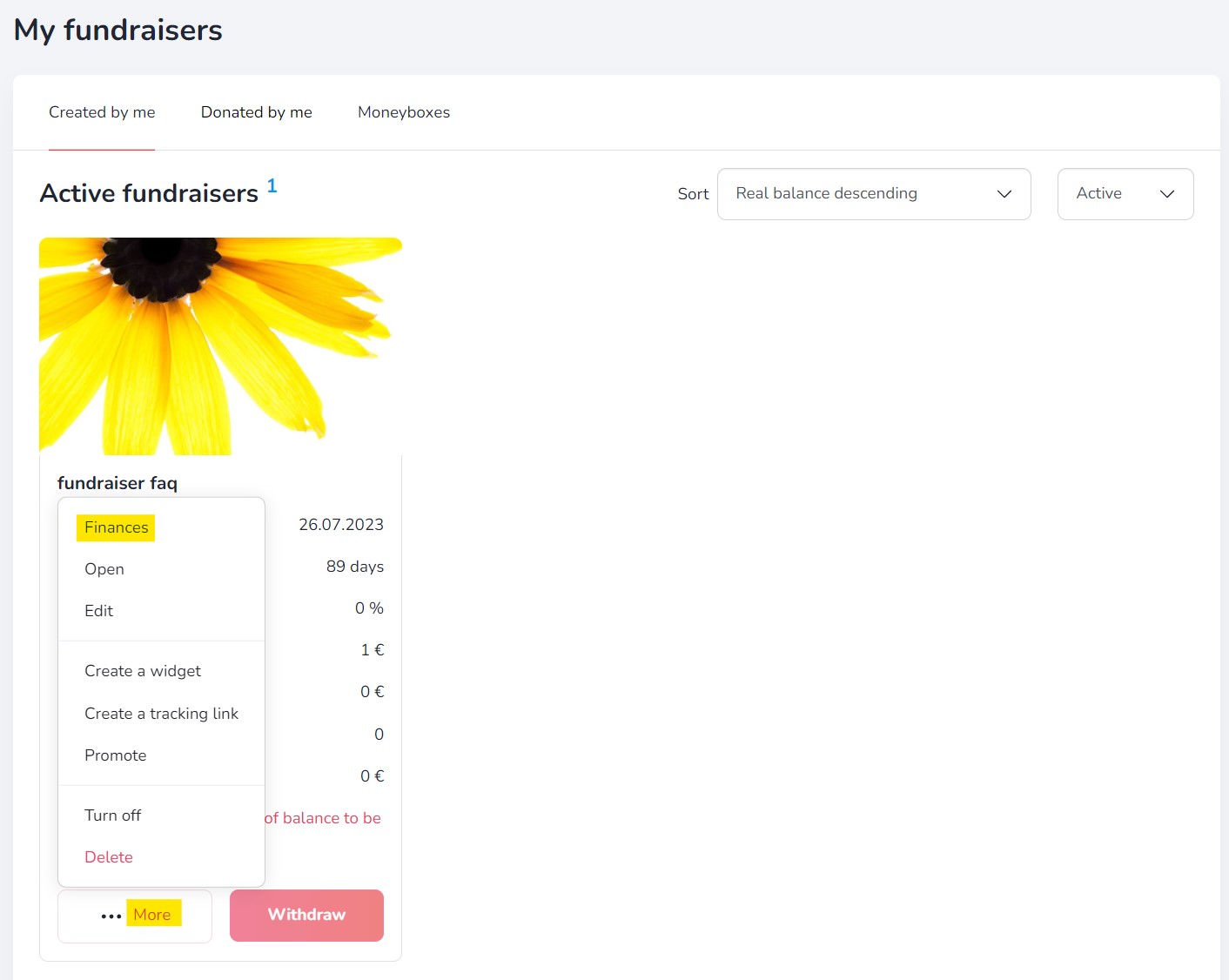
You can view Donators details by generating a donations summary (even for anonymous and unregistered Donators). Just go to 'My fundraisers' tab -> click '...More' -> 'Finances' -> and 'Export XLS file'.
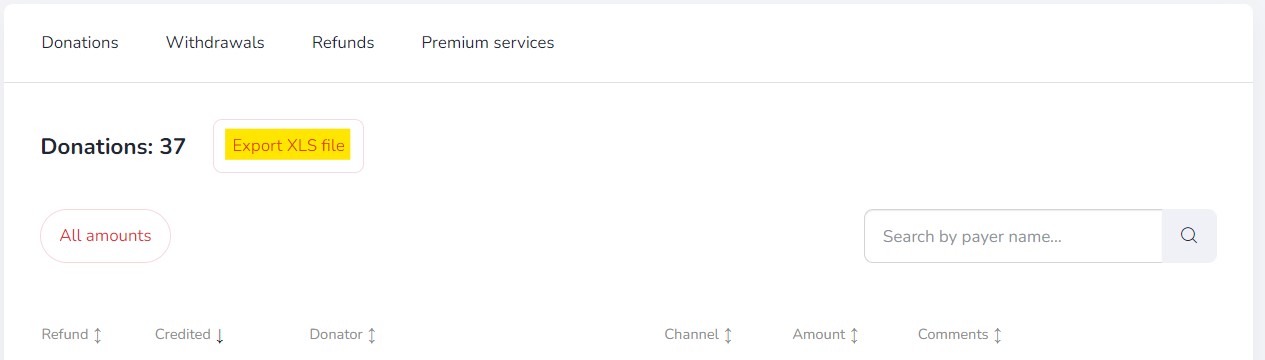
In the donation summary you will find a complete list of Donators to a given fundraiser, including the amount of the donation, the payment method, the email address given when making the donation and other data (if available).
Additional features
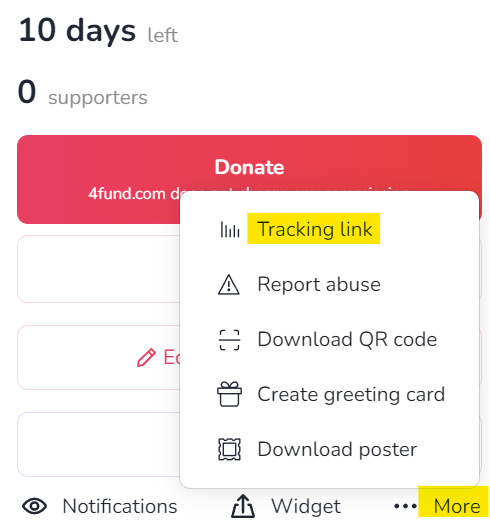
If you want to create your own tracking link that will show you statistics of clicks and donations, press the 'More' button on the selected fundraiser, and click "Tracking link":
Chose and write your own tracking link or click in "Random" button to generate random string:
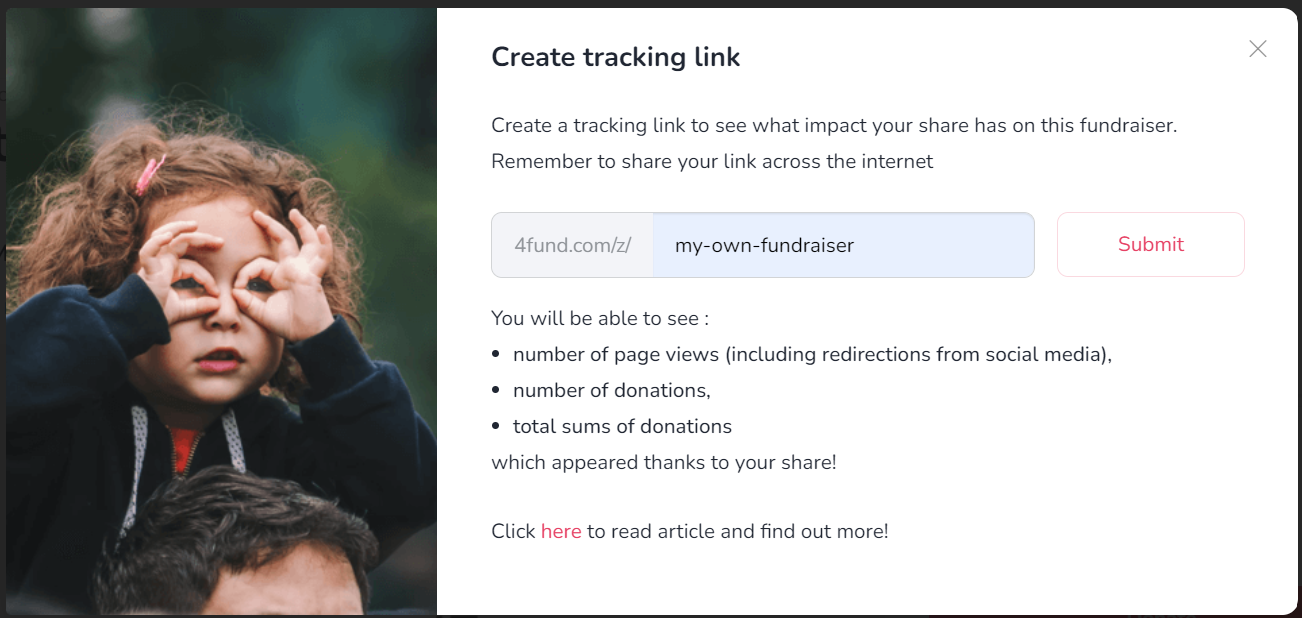
Now click the 'Submit' button:
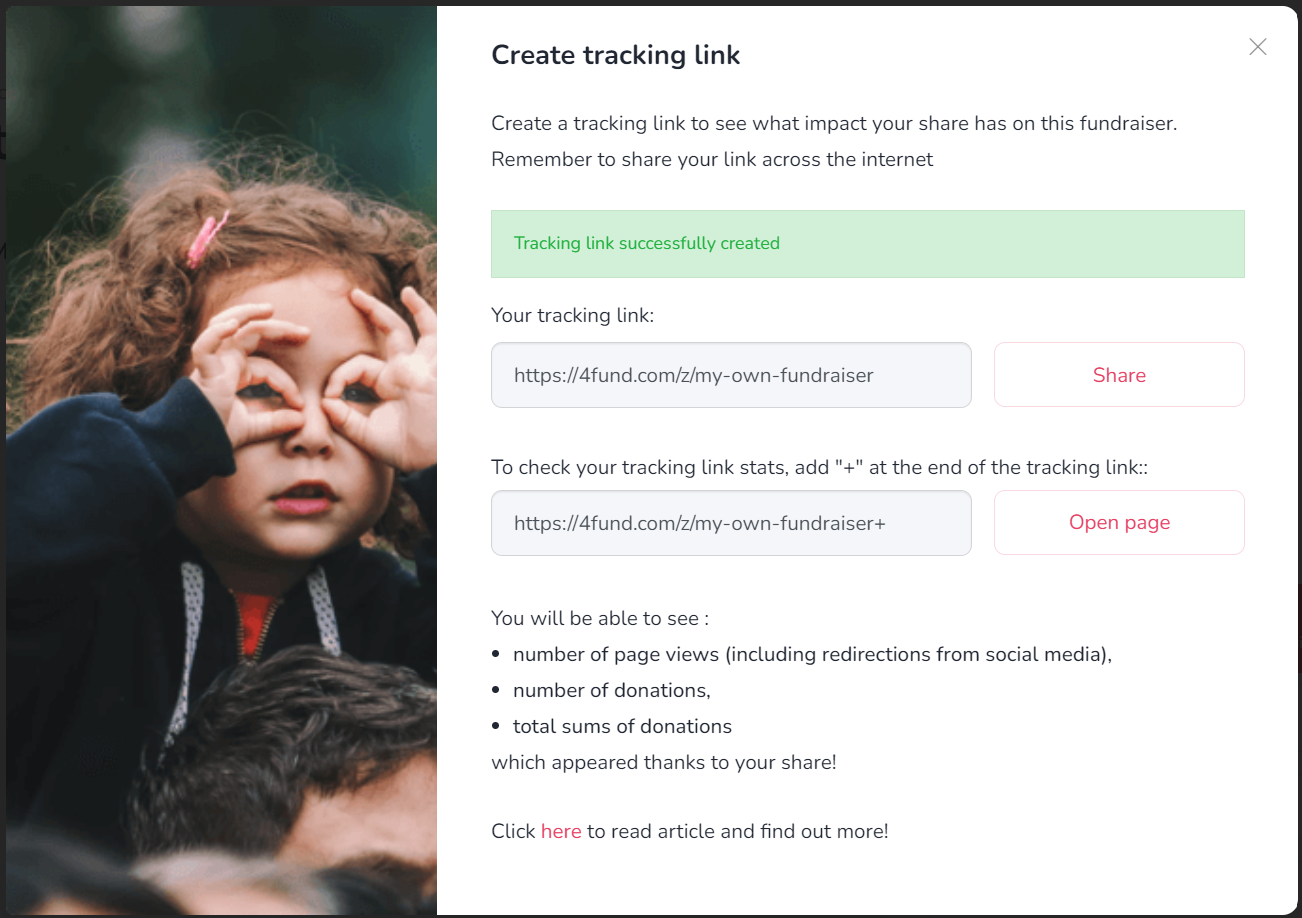
To check how many people clicked on the link and how many donations were made using that link, add the '+' sign at the end (e.g. 4fund.com/z/my_fundraiser+). You can create multiple tracking links for each fundraiser.
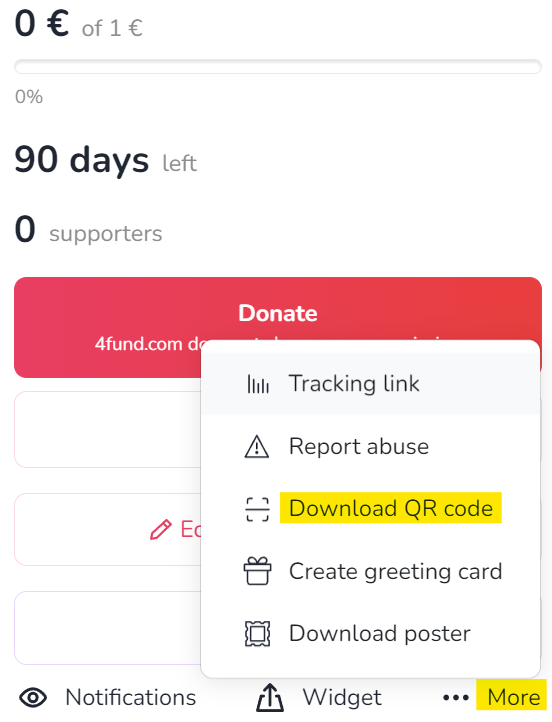
You can generate a QR code for each fundraiser. Just take a photo of it and this will allow you to access its details or to go directly to the payment. You can place the QR code on anything physical: posters, leaflets, presentations, billboards, or by showing your friends on the phone screen. You can forget about dictating the address of your fundraiser - click on the fundraiser page '...More' -> 'Download QR code' and you're done
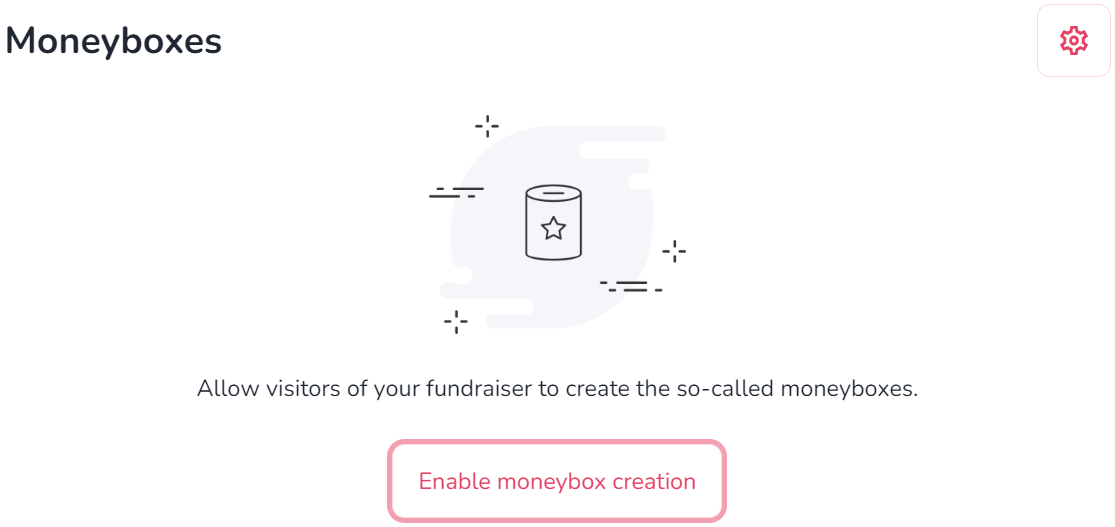
The moneybox on 4fund.com works like an online donation box - employees of a specific company, fans of a particular celebrity, or people gathered in one Facebook group can transfer donations to it and watch how much funds they managed to raise. The person creating the moneybox appears as the Organiser and can edit its description, link, as well as thanks for the payment. All the funds raised in the moneybox are credited to the balance of the main fundraiser. An important detail is when you create a moneybox for someone else's fundraiser, you don't have to verify your account!
The moneybox section is located in the fundraiser view under the rewards posts. To allow users to create moneyboxes for your fundraiser, click 'Enable the ability to create moneyboxes'. You can also create a moneybox yourself by clicking 'Add moneybox'.
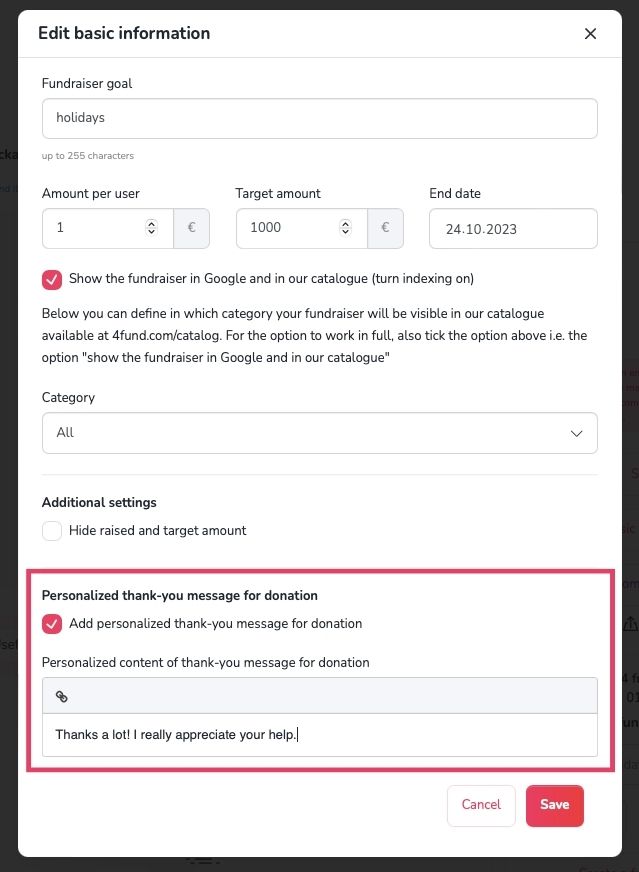
If you want to show gratitude for a donation you have received, you can create your own personalised ‘thank you’ for the donation and set its content in the fundraiser 'Edit basic information' section. Posting updates is also a great way to keep your Donators in the loop and connected.
Creating a fundraiser is a very simple operation. A basic fundraiser can be created in less than 30 seconds! However, for professional and more demanding users, we have prepared a few interesting solutions, like tracking link, moneyboxes, rewards, widgets, QR codes and much more. All advanced functionalities of 4fund.com have been collected for you in this blog article. Enjoy reading!
End of fundraiser
Yes. You can end your fundraiser at any time. There are no fees or financial penalties for ending it early.
If you no longer want to continue fundraising, you can leave your fundraiser as it is, disable it, or delete it.
Your fundraiser will remain active even after its end date. You can still receive donations and withdraw the funds you've collected at any time.
Once the end date has passed, the countdown showing the number of days remaining will disappear from your fundraiser page.
If you'd like to extend your fundraiser, you can set a new end date at any time.
You can temporarily disable or permanently delete your fundraiser.
Disabling a fundraiser: Your fundraiser remains visible, but it no longer accepts new donations. You can re-enable it at any time.
Deleting a fundraiser: Your fundraiser will no longer be visible to visitors and cannot be re-enabled.
To disable or delete your fundraiser:
- Go to ‘My fundraisers’ tab.
- Select ‘More’ on the fundraiser you want to manage.
- Choose ‘Turn off’ or ‘Delete’ from the menu.
To re-enable your fundraiser:
- Go to ‘My fundraisers’ tab.
- Apply the ‘Disabled’ filter.
- Select the ‘Enable’ option from the drop-down menu in the chosen fundraiser preview.
General
At 4fund.com, we care deeply about the security of both our organisers and donors. To build a trustworthy crowdfunding community, we make sure that everyone on our platform can feel safe.
As a licensed Payment Services Provider we are legally obliged to follow strict European Anti-Money Laundering (AML) and Counter-Terrorist Financing (CTF) regulations. Consequently, we must establish and confirm the identity of our users. This helps us protect our community from fraud. In addition, in certain cases, we also verify the credibility of the fundraiser’s description itself.
Please note that verification of identity is mandatory only for fundraiser organisers. If you are a donor, you do not need to go through an identity verification process.
Yes, absolutely. We take data privacy and security extremely seriously. As a licensed Payment Services Provider, we operate under strict financial regulations to ensure the highest standards of safety. Your sensitive information is stored safely and used strictly for identity verification purposes in compliance with GDPR regulations.
Below you will find documents - templates of powers of attorney and consents that may be useful during the profile and fundraiser verification process:
- Consent to run the fundraiser on my behalf and to process my medical records (download)
- Consent to process my medical records (download)
- Consent to run the fundraiser on the behalf of the person under my care and to process their health records (download)
- Consent to run a fundraiser on my behalf (download)
- Consent to run a fundraiser on the behalf of a person under my care (download)
- Consent to run a fundraiser on behalf of an institution in which I am employed/which I manage (download)
- Declaration of PEP status (download)
- Declaration of sources of assets - PEP (download)
Profile verification
Profile verification consists of two main parts: completing the identification form and submitting your verification documents. To start the process, follow these steps:
- Log in to your user profile.
- Click on your profile icon in the top right corner and select 'Account verification' from the drop-down menu.
- Fill in the identification form with your accurate personal details (name, personal identification number, address, and identity document information).
Note: Make sure all data is correct, as you will not be able to edit it after saving the form. - Complete the PEP (Politically Exposed Persons) statement regarding whether you hold a prominent public position.
- Review the summary of your information carefully and click 'Next Step' to save.
Once saved, your fundraiser will be active for 30 days, during which you must complete the document verification to enable withdrawals and keep your campaign running.
To finish the process, use our automated verification tool, Onfido, to submit a photo of your identity document and a video of your face. If all data matches, your profile will be automatically verified within a few minutes, and a verification icon will appear on your account.
Filling out the identification form takes just a few minutes. If all the information provided in your form matches your identity document and facial video, your account will be automatically verified almost immediately.
During the profile verification process, you will be asked to send a photo of your identity document: identity card (both sides), passport (photo side) and residence card (both sides). The details and photo on the document must exactly match your registration details and the image from the short video taken during the biometric verification process.
No, to activate donations you need to complete the identification form. As soon as you fill it out, your fundraiser goes live for 30 days, allowing people to freely make contributions. During this period, you must successfully complete the remaining part of the verification process (including submitting your ID and a facial scan) to be able to withdraw the raised funds.
Yes. As a licensed Payment Services Provider, we are legally required to confirm the identity of our users to ensure the highest standards of financial security and compliance. This process (biometric verification) ensures that the person creating the profile is the actual legal owner of the identity document.
No. To successfully complete the security check, the photos of your identity document must be completely clear, of good quality, and show all four edges of the document without any information being cut off, covered, or blurred. The details on the document must fully match the information you entered in the registration form and the image from your facial verification video.
If your automated verification was unsuccessful, it is usually due to one of the following common reasons:
- Data mismatch – the personal details entered in your identification form do not exactly match the information on your identity document.
Note: Please check your inbox (including your spam folder) as our system automatically sends an email notification in this case. You may simply need to review and confirm your data via the link provided. - Document issues – your identity card or passport has expired, or the document type is not supported by our system.
- Poor photo or video quality – the photos of your ID were blurry, reflective, had information covered, or the edges of the document were cut off. Alternatively, your facial verification video may have been unclear or taken in poor lighting.
If your verification is rejected, please contact us, and we will check your application and assist you in completing the process successfully.
PEP stands for Politically Exposed Persons. As a national payment institution, we are legally obliged to identify whether our users hold prominent public functions (such as a minister, president, or senator). This is a standard regulatory requirement for financial platforms, which is why the PEP declaration is included in your account setup form.
If you have filled out the PEP form incorrectly by mistake, please contact us. Our team will unlock the form for you so you can correct your answer and proceed with your verification.
Organisation verification
After you register, you must verify your account as a private individual first. Only once you have successfully completed this initial personal verification will you be able to submit the details for your company or organisation account.
Once you have passed your personal profile verification, you can proceed to fill in the form for your company or organization.
Our customer support team will carefully review your application and reach out to you via email. We will guide you step by step through the process of setting up your institutional profile, including providing detailed information about any verification documents required for your specific organisation type.
Check out our blog post for a more detailed step-by-step guide on institutional verification.
Unlike private profiles, institutional accounts are reviewed manually by our team to ensure the highest safety standards. If all submitted documents are correct and compliant, your organisation account will be verified within two working days.
Fundraiser description verification
As a licensed Payment Services Provider, we operate under strict financial regulations to ensure the highest level of safety and security for both organisers and donors. In order to protect our community against fraud, we are legally required to verify the description and purpose of a campaign in the following four specific situations:
- When you want to launch an official fundraiser promotion.
- When the balance of a single fundraiser exceeds EUR 5,000.
- When you collect a total of more than EUR 12,500 across all fundraisers on your account.
- When we receive a report of abuse or have doubts regarding the reliability of a specific campaign, regardless of the amount raised.
You can easily submit the required documentation through your account dashboard using one of two methods:
- Go to your profile settings and select the 'Verify a fundraiser' tab
- Or verify directly from the editing view of your chosen fundraiser. Log in, scroll to the very bottom of the fundraiser page, and upload the necessary files in the designated field.
The documents you need to upload depend entirely on the purpose of your fundraiser. You should provide official evidence that confirms how the raised funds will be spent. This may include:
- Medical records, invoices, or cost estimates (for medical fundraisers).
- Invoices, receipts, or agreements with suppliers (for project or business fundraisers).
- Written consents or powers of attorney if you are collecting funds on behalf of someone else or an institution.
For more information, check out our blog post.
Note: If you need official templates for consents or declarations, you can find them in the 'Document templates' section.
When verifying the description or goal of your fundraiser, our team must manually check the attached documentation. We always try to speed up the process as much as possible, but please bear in mind that checking these documents can take up to two working days, depending on the complexity of your fundraiser and the information provided.
Note: We may contact you if we require additional information or clarification regarding your submitted documents. In such cases, the fundraiser description verification process may take longer.
General
It's completely free! Creating and running a fundraiser, as well as making donations, is 100% free for both organisers and donors. We do not charge any mandatory commissions on donations or withdrawals, meaning the full amount goes directly to the fundraiser.
To keep our platform free, both donors and organisers can support us with a voluntary tip during the donation or withdrawal process, but it is never required.
General
Creating a profile takes just a few seconds. You can register a new account directly by filling out the form on our homepage. Simply enter your email address, set a secure password, and follow the on-screen instructions to get started.
To set up an account for a foundation, association, or business, complete the brief application form. Our customer support team will then (if we accept your request) reach out to you via email and assist you step by step to go through a manual company onboarding process.
Donations
To donate funds to a fundraiser, just click the ‘Donate’ button on the selected fundraiser’s page. Choose the amount you wish to give, select your preferred payment method, and complete the basic information in the payment form to finalize your transaction. Your donation will be processed immediately, ensuring that the funds reach the fundraiser quickly and securely.
To make a donation, you can select from our available secure payment methods: Visa, Mastercard, Apple Pay, Google Pay, Revolut, ZEN, iDeal, Bancontact, Multibanco, MB WAY, N26, Skrill and EPS.
You can support your favourite causes with automatic monthly payments if the fundraiser organiser has enabled this option. To set up a recurring donation:
- Click 'Donate your way' on the fundraiser page.
- Specify your monthly support amount.
- Select the recurring payment option during the checkout process.
Please note that to set up, manage, or cancel your recurring donations, you must be logged into your 4fund.com account.
Yes, you can support fundraisers using your preferred local currency. When making a donation, simply select your currency of choice from the list (such as GBP, USD, PLN, CHF, and many others). Since all fundraisers on 4fund.com are officially run in euros (EUR), your donation will be automatically converted to EUR during the secure payment process.
No. To ensure that our platform remains 100% free of charge for everyone, we are unable to offer PayPal as a payment method. However, we provide a wide range of other secure and convenient payment options.
Of course! Donations from abroad can be made regardless of the local currency, from anywhere in the world – your donation will be automatically converted by the bank and will reach the fundraiser in euros.
If you don’t want your name to be visible on the fundraiser page, you can check the box 'Hide my details in the public list of donations on this fundraiser' during the payment process. You can also choose 'Hide the donation amount in the public list of donations on this fundraiser' if you wish to hide only the specific value of your contribution.
Online payments are processed and credited to the fundraiser almost immediately, typically taking up to 5 minutes.
You will always receive a payment confirmation via the email address provided during the donation process. Additionally, you can find your payment listed under the ‘Donors' tab visible on the fundraiser page (unless the organiser has chosen to hide donor data).
You can also download an official PDF confirmation directly from your profile:
- Log in to your user profile.
- Go to 'My fundraisers' → 'Donated by me'.
- Open the preview of the specific fundraiser and select 'Donations' → 'Donation details' → 'Download confirmation PDF'.
If you have donated to a fundraiser, it may not be possible to receive a refund, as we transfer the funds raised to the page owner directly. However, you can contact the Organiser of the fundraiser with a request for a refund, using the 'Ask the Organiser a question' button.
If you supported 4fund.com with an optional tip by mistake, please contact us to request a refund.
To make a refund to donors, follow these steps:
- Go to the 'My fundraisers' tab and click the 'More' button on the selected fundraiser.
- Select 'Finances' from the drop-down menu.
- Choose the specific payments from the list that you want to return to donors.
- Press the 'Return selected' button at the bottom.
- Decide who will bear the return costs (€0.5 for each transfer) – the organiser or the donor.
Account management
If you are having trouble signing in or simply cannot remember your password, click the 'I forgot my password' button in the login window. After that, you will receive an e-mail with an active link to create a new password.
To change your e-mail address, please contact us, and we will guide you step-by-step through the e-mail address change procedure.
Adhering to our regulations, it is not possible to change the organiser to another person or organisation. Nor is it possible to change the organiser's core data – the details must remain consistent with the registration form, payment card, and identity document. However, in exceptional cases (such as a legal change of surname), it is possible to correct the profile data. In this case, please contact us for assistance.
To delete a profile, follow these steps:
- Go to the 'Settings' tab.
- Choose the 'Profile settings' option. Go to the bottom and click the ‘Delete account’ button.
Please note: To delete your account, your balance must be zero. If you have any funds left on your fundraisers, you must withdraw them or return them to the donors first.
Reccuring fundraisers
A recurring fundraiser, in addition to a single donation, allows regular monthly donate for the Organiser. The Organiser of such a fundraiser has the chance to create a steady, recurring source of income, and Donators can receive regular rewards for their donations, i.e. access to the author's content.
At 4fund.com, neither you nor your Donators need to have a PayPal account. You can donate to the fundraiser by card and the most popular online methods. All this for free and without commission! 100% of the funds raised will be paid out whenever you want.
Try it now on https://4fund.com/recurring!
The recurring fundraiser differs slightly in appearance from the regular fundraiser - the amount of funds raised is illustrated in the form of a progress wheel, and the amounts are given in two versions - total and monthly.
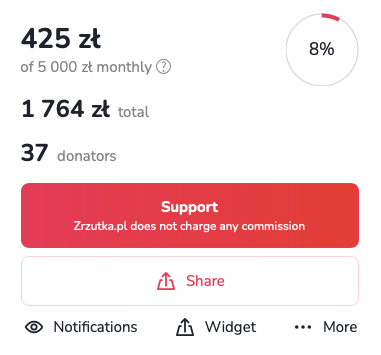
Recurring fundraisers are most often used by online creators, i.e. youtubers, bloggers, streamers, musicians, podcasters or photographers. Donators pay monthly sums into the account of the Organisers, who get the opportunity to develop their passions and talents, and Donators get great rewards and satisfaction from donating interesting projects! You use the recurring fundraiser for free - we do not charge any fees or commissions.
The recurring fundraiser is therefore a solution for anyone who has something to offer their audience - in a subscription model, of course. It is also a place for Donators who, by donating to interesting projects, can receive unique rewards!
Creating a recurring fundraiser is as simple as creating a regular one. You can do this by entering the goal of your new fundraiser in the form at https://4fund.com/recurring. Once you have created your fundraiser, don't forget to create an interesting description and add images. You can also offer unique rewards to Donators.
Profile settings
To update your basic personal information, go to 'Settings' and select the 'Edit details' tab. From there, you can upload or change your profile picture, add a short bio and insert a link to your website.
Your phone number may be useful for account communications and security verifications. To add or change your number:
- Go to your 'Settings' dashboard and select the 'Phone number' tab from the left-hand menu.
- Choose your country prefix code from the drop-down list (e.g. PL +48).
- Enter your current mobile number in the 'Phone number' field and save your changes.
You can completely customise what information other users can see on your public profile page. To adjust these privacy settings:
- Go to 'Settings' and select the 'Profile settings' tab.
- Under the 'Show in my public profile' section you can choose to show or hide your e-mail, phone number, registration date, fundraisers (private, promoted, donated, or organised on behalf of an organisation), profile photo, and total amount raised.
To control how you receive security codes for sensitive actions on your account, follow these steps:
- Select the 'Limits and authentications' tab from the side menu.
- Under 'Authentication method', choose whether you want to receive your 6-digit security codes via 'SMS message' or 'Email message'.
- Save your changes to complete the setup.
If you are waiting for your authentication code and it has not arrived yet, there are some things you can do:
- Check your spam folder – if you find a message with a code in the SPAM folder, mark it as a safe message so that the problem does not arise again in the future.
- Check your mailbox storage – make sure that your mailbox is not full and can receive new messages.
- Wait a brief moment – although rare, temporary network delays can sometimes occur.
- Request a new code – if you have waited more than 5 minutes, request a new code.
- Switch your authorisation method – consider switching your settings from email to SMS (or vice versa) to receive your codes via an alternative channel.
Authentication codes are generated automatically and are only valid for 5 minutes. If this time has expired, you must repeat the action on our website to generate a new code.
Note: Requesting a new code automatically deactivates all previous ones. If you have made multiple attempts, make sure you enter the code from the very last message you received.
Reccuring payments
A recurring donation works in a similar way to a standing order at your bank. By selecting the recurring donation option, you set an amount that will be automatically debited from your card each month and transferred to the account of the selected fundraiser.
As a logged-in user, you can transfer such fixed donation to those fundraisers that are recurring. You can deactivate automatic donations at any time in the settings in your user profile.
If there is not enough funds in your account on the payment date, the system will make a repeated attempt to transfer funds for 3 consecutive days. If there is not a sufficient funds in your account within this time, the system will not attempt to make the donation again until the following month.
If you no longer wish to donate a particular fundraiser, the option to cancel donate can be found in your account settings ('Settings' tab → 'Recurring donations' tab → 'More' → 'Disable')
Withdrawals
To withdraw your funds:
- Go to the 'Withdraw funds' tab in your profile.
- Select the fundraiser you want to withdraw money from.
- Click the 'Pay out' button.
- Enter the desired amount and fill in the withdrawal details.
- Finally, confirm the transaction using the authentication code sent to your email address or phone number.
Please note that to withdraw funds, you must first complete your payment card details for withdrawals. If you experience any issues, please contact us, and we will guide you on how to withdraw funds via a traditional bank transfer to your account.
Yes, absolutely! On 4fund.com, you keep everything you collect, and you can withdraw your available balance at any time – even if your target goal has not yet been fully reached.
You can withdraw funds at any time, even if your fundraising goal has not yet been reached.
Withdrawn funds will be credited to your payment card almost immediately after requesting the payout through your profile (usually within a few minutes) thanks to VISA Direct and Mastercard Send solutions.
Please note that this process may take a few business days if you requested a withdrawal to your bank account.
No. Payout details are strictly confidential and visible only to you. The withdrawn amount will disappear from the balance available for withdrawal inside your private 4fund.com account dashboard, but the total amount visible on your public fundraiser’s page won’t change.
For safety reasons and in compliance with financial service regulations, we may temporarily apply a withdrawal lock to verify your fundraiser’s reliability. If withdrawals from your fundraiser have been locked, we will immediately inform you via email detailing exactly what steps or documents are needed to unlock your account. Please make sure to check your inbox carefully, including your SPAM folder.
If your payouts are blocked and you haven't received an email from us, please contact us.
To adjust your transaction thresholds and set up payout notifications, follow these steps:
- Go to 'Settings' and select the 'Limits and authentications' tab from the side menu.
- Under 'Limits and SMS notifications', you can adjust your 'Daily payout limit' using the drop-down menu.
Notifications
You can receive updates about new donations, comments, and news directly to your email address. To enable or disable these notifications at any time:
- Go to the specific fundraiser page.
- Click the 'Observe' button.
- Tick or untick the boxes for the updates you wish to receive or stop receiving.
To sign up for our newsletter and receive the latest articles, useful tips and summaries of the most interesting fundraisers, click here and leave us your e-mail address.
If you want to stop receiving our newsletter, follow these steps:
- Go to the 'Settings' dashboard.
- Select the 'Profile settings' tab.
- Scroll down to the 'Other' section.
- Untick the checkbox: 'I want to receive occasional emails about the most interesting events and campaigns on 4fund.com'.
You can also just click the 'Unsubscribe' link located in the footer of any newsletter you receive from us.
Support tiers
Support tiers are a feature available in recurring fundraisers. They allow organisers to create different levels of monthly support (like €5, €20 or €50) and offer specific benefits to supporters in return, such as:
- exclusive posts,
- early access to content,
- behind-the-scenes updates,
- access to private groups,
- special acknowledgements or perks.
Watch a short video to find out how the support tiers work:
Posts in support tiers are exclusive pieces of content available only to supporters who contribute at a specific tier level (or higher). They allow organisers to share updates, behind-the-scenes content or rewards with their recurring supporters.
A post can include:
- text,
- links,
- images,
- videos
- and other materials.
Adding support tiers is very simple:
- Go to your recurring fundraiser (you can find it on the “My fundraisers” page).
- Click the “Add support tier” button below the section showing the total amount raised, the number of donors and the monthly contributions.
- Enter the support tier details, such as the title, contribution amount and description.
- Once everything is ready, click the “Save” button. Your support tier will then be visible on your fundraising page.
You can find a detailed step-by-step guide on our blog.
- After creating a support tier, click the “Manage” button next to the selected tier. Then choose “Add post.”
- Fill in the post details, such as the title, description and cover image.
- Select who can see the post – “For any tier” or “For this tier or higher”
- Click “Save” to publish the post.
From that moment, the content will be visible only to eligible supporters.
Thanks to support tiers, supporters can enjoy a membership-like experience, feel appreciated and become more connected to the project.
For organisers, support tiers can provide stable, predictable monthly income, encourage long-term support, increase engagement and build a stronger community.
Support tiers are available for anyone running a recurring fundraiser on 4fund.com – including creators, influencers, non-profit organisations and individuals looking for regular monthly support.
Taxes & Invoices
To receive invoices for purchased premium features, use the following steps:
- Log in to your user profile.
- Go to the 'Settings' tab and select 'Invoices'.
- Check the 'I want to receive invoices' checkbox.
Please note that it is not possible to get an invoice for services purchased before checking the checkbox. We also do not issue invoices for donations.
We do not provide tax advice. If you want to know more, check with a tax professional to be sure or contact your country’s tax office.
Other
4fund.com is an online fundraising platform where people can raise money for the causes and goals that matter to them.
We believe everyone should have the opportunity to ask for support and bring their ideas to life, without worrying about mandatory platform fees or commissions. That's why creating and running a fundraiser on 4fund.com is free.
4fund.com is operated by Zrzutka.pl sp. z o.o., the company behind Poland's leading crowdfunding platform, Zrzutka.pl, with 13 years of experience in online fundraising.
All official emails from 4fund.com are sent exclusively from @4fund.com and @mail4fund.com domains. If you receive a message claiming to be from 4fund.com from a different domain, do not click any links and report it to us at [email protected]. To make sure our emails reach your inbox, we recommend adding these domains to your trusted senders list.
There are some activities that are prohibited on 4fund.com:
- You may not raise funds for any goal that would be illegal in your country or in Poland (the country of our registered office). Polish law does not prohibit most fundraiser's goals, but with one notable exception - you may not raise funds to cover fines or bail imposed in the criminal proceedings.
- The goal or the description of your fundraiser may not endorse, support or promote hatred, violence, discrimination, terrorism, fascism or other totalitarian regimes, or publicly condone crimes.
- You may not harm, slander or defame anyone through your fundraiser. This applies both to your fundraiser’s goal and its description. You may raise funds to finance legal proceedings against someone (e.g. to pay lawyers fees), but if you indicate any circumstances that may defame someone in the description of your fundraiser, and that someone raises objections to us, you will have to prove that what you write is true with an appropriate official document (e.g. a relevant court judgment). Remember that 4fund.com is neither a court of law nor a place of dispute resolution.
- You may not raise funds to buy weapons (regardless of legality of such purchase).
- You may not raise funds to finance gambling, prostitution or pornography (regardless of legality of such activities).
- You may not use 4fund.com to finance or spread misinformation or fake news. If we find what you write in your fundraiser’s description doubtful, we will need you to prove it. Keep your fundraiser’s description true and verifiable.
- You may not offer shares in companies for donating to your fundraiser or construct a fundraiser where the donations would be treated as loans to you from your Donators. This is because we are a donation-based crowdfunding site, not an equity crowdfunding one - if your business plan includes such a solution, we suggest you use a specialized site.
Yes. As a Licensed Payment Services Provider we are obliged to ensure the highest safety standards for your payments and data.
Find out more at the 'Safety & security' tab.
At 4fund.com, we follow a number of requirements and procedures to ensure that your data and your funds are safe. We have also prepared a list of the most important rules for using our fundraising platform safely.
Read this article on our blog to learn how to avoid online scams and keep your money safe.
4fund.com is licensed to provide payment services in the European Economic Area and, under this licence, is obliged to verify the identity of its customers. It is run by the Polish company zrzutka.pl which is the leading crowdfunding site in Poland.
There are two verification processes.
- Profile verification
- Fundraiser cause verification
We also use a global entity verification and background check company called Onfido. Their technology allows us to verify our users to the highest extent.
We also use a variety of methods to verify Organisers and ensure the legitimacy of fundraising campaigns. These include:
- Identity verification
- Biometric verification
- Review process
Thanks to these procedures, we know exactly who is raising funds on 4fund.com and we can take care of the right level of security.
For more information of verification process on 4fund.com, please visit our blog.
In order to keep your data as secure as possible, you can additionally make sure, that nobody is looking above your shoulder!
We verify the identity of all Organisers. In addition, in situations defined by our regulations (for example, when we exceed certain fundraising thresholds or when we receive applications for a particular fundraiser), we also verify the truthfulness of the goal stated in the description of the fundraiser, asking the Organiser to send us relevant documents to confirm it. In case we have doubts whether the funds from an ongoing or already completed fundraiser have been used in accordance with the Organiser's declarations, we can also check their spending by asking, for example, for transfer receipts, invoices or receipts.
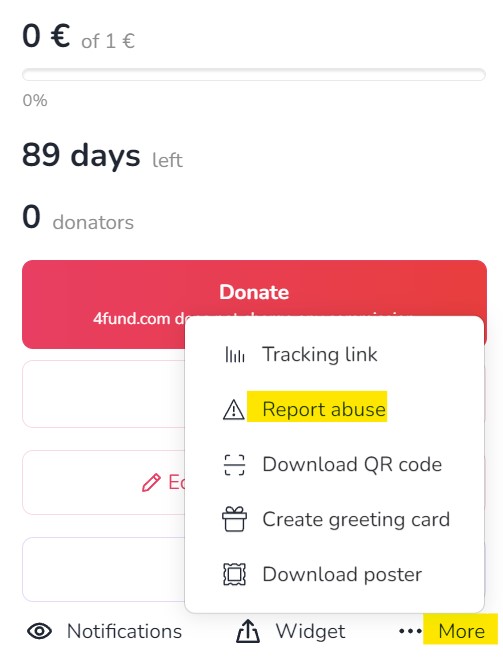
If you have any doubts or concerns about a particular fundraiser, please contact the Organiser to confirm its reliability. You can also report abuse to the fundraiser, which will be analysed by our staff.
If you are concerned about the legitimacy of a fundraiser on our site, be sure to report it to us using the 'Report abuse' button. All such reports are analysed by our team. We are pleased that our users remain vigilant, as this enables us to detect any potential abuse more quickly and efficiently. Only fundraisers that violate our terms of use will be removed.
The user can, at any time, block the installation of cookies, delete permanent cookies or otherwise modify the conditions for storing or receiving cookies by using the appropriate options of their Internet browser, i.e. Microsoft Edge, Mozilla Firefox, Google Chrome, Opera, Safari.
In each Organiser's profile on 4fund.com, just below the title and Organiser's name, you'll find information on how the profile has been verified.
Additionally, in the case of charitable fundraisers (for medical treatment, the aftermath of fires or animal treatment etc.) the fundraiser may additionally have a credibility icon. This means that the Organiser has sent us additional documents confirming the truthfulness of the description of the specific fundraiser.
Other
Our public API is available at https://4fund.com/api/v1/public/doc. If you wish to receive access, please send a request via the form in the contact section.
After reviewing your application and the planned use of the API, the service will assign a dedicated 'access_token'.
If you have any suggestions/new endpoints, please let us know. At the same time, we warn you that endpoints supporting key functions such as:
- login/registration/reset user password
- payment
- withdrawal of funds
- user verification
- premium purchase
- checking the payout balance
are not publicly available and may only be made available to those that offer various services based on access to bank accounts, e.g. data aggregation or personal finance management. Among them, there may be only banks, payment institutions or other providers that have an appropriate license for this type of service (due to the regulations contained in the Payment Services Directive 2 - an EU directive that introduces a single payment market in EU countries).
Other
To verify a corporate account, please follow the detailed steps outlined in our blog post. This guide will walk you through the entire process step by step.
You can read the full instructions here.
If you have any questions or need further assistance, feel free to contact our support team.
Fundraising for a nonprofit organisations has never been easier! Create a fundraiser on behalf of the organisation you care about most. Support their cause and make a difference now! Check out the blog article.
Or perhaps you run a nonprofit organisation? Would you like other users to help you achieve its goals? Give them the opportunity to create fundraisers on behalf of your organisation! Read our guide for NGOs and follow three simple steps to be listed in our NGO catalogue as a fixed beneficiary!
For fundraisers organised on behalf of an organisation, the organiser sets up and manages the fundraiser, but the donated funds go directly to the beneficiary organisation. In this type of fundraiser, you can find the name and logo of the organisation just below the fundraiser's cover photo.

On 4fund.com you can easily, quickly and safely create a fundraiser on behalf of an NGO you care about. All you have to do is go to https://4fund.com/patronized-fundraising, fill in a short form and choose an organisation from the catalogue. Wait for the selected NGO to approve your fundraiser. And that’s it!
After the organisation approves your fundraiser, you can start raising funds! You don't have to worry about billing - all collected funds will go directly to the charity organisation for which you've created a fundraiser.
Become a Fixed Beneficiary is all you need to allow others to create fundraisers on behalf of your organisation. The first step is to have a fully verified profile for your foundation or organisation. If you haven't done this yet, you can register your organisation. Once your account is verified, you will find the 'Become a Fixed Beneficiary' tab in your account settings.
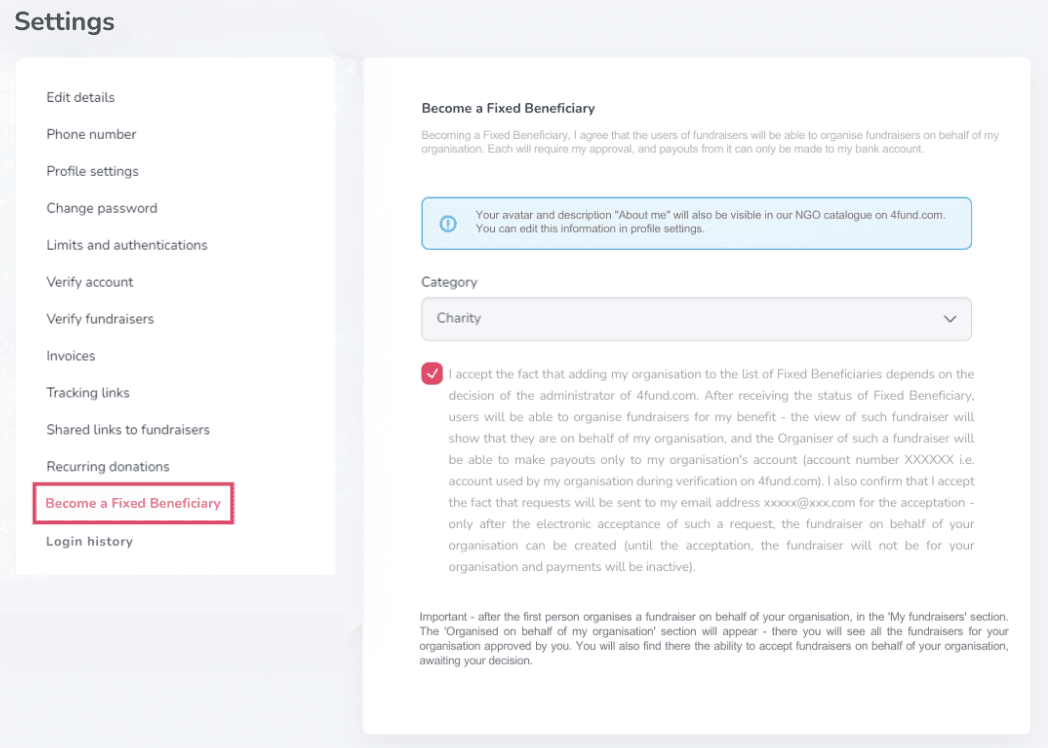
For more information, see our guide on fundraisers for NGOs.
As a Fixed Beneficiary, you will receive a dedicated landing page. Additionally, a box will appear on your profile, allowing anyone to set up a fundraiser on your behalf.
Other
On 4fund.com, "Offers" and "Auctions" are innovative features that allow fundraisers to raise money by selling or auctioning items and services. This approach enables supporters to contribute financially while receiving something in return, enhancing engagement and providing additional fundraising avenues.
Offers
- Buy Now: Supporters can purchase items or services at a fixed price.
- Categories: Offers span various categories, including fashion, books, electronics, crafts, digital downloads, and unique experiences.
- Digital Delivery: For digital products like e-books or vouchers, buyers receive instant access upon payment.
- No Fees: 4fund.com does not charge commissions, ensuring that 100% of the proceeds go directly to the fundraiser.
Auctions
- Bidding: Supporters can bid on items or services, with the highest bidder winning the auction.
- Notifications: Participants receive email alerts if they are outbid or when an auction is nearing its end.
- Transparency: All auctions are managed directly on the platform, eliminating the need for external communication.
- Support for Causes: Funds from auctions go entirely to the associated fundraiser, allowing supporters to contribute meaningfully.
Adding offers or auctions to a fundraiser on 4fund.com is a straightforward process that enhances fundraising efforts by providing supporters with tangible incentives. Here's how you can add offers or auctions as an organizer:
1. Log In and Access Your Fundraiser:
- Sign in to your 4fund.com account.
- Navigate to your fundraiser page.
2. Add an Offer or Auction:
- Scroll to the "Offers/Auctions" section.
- Click the "+" button to open the form for adding a new offer or auction.
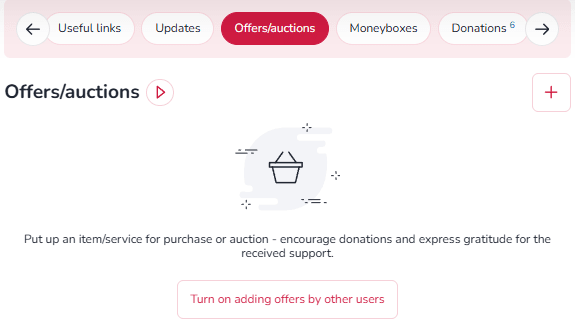
3. Fill in the necessary details:
- Title and Description: Provide a clear and concise title and description of the item or service.
- Category and Condition: Select the appropriate category and specify if the item is new or used.
- Images: Upload images to showcase the offer (optional but recommended).
- Purchase Mode: Choose between "Buy Now" or "Auction."
- Price and Quantity: Set the price and specify the number of items available.
- Delivery Method: Select the delivery option—personal collection, postal dispatch, or email (for digital items).
- Attachments: For digital products, add downloadable files that buyers will receive upon purchase.
- Contact Information: Optionally, provide a phone number for buyer inquiries.
Auctions on 4fund.com provide a dynamic and engaging way to support fundraisers by bidding on unique items or services. All proceeds from these auctions go directly to the associated fundraiser, with no platform fees or commissions involved.
How to Participate in Auctions
- Discovering Auctions
- Fundraiser Pages: Navigate to a specific fundraiser and scroll to the "Offers/Auctions" section beneath the description to view available auctions.
- Auction Catalog: Browse the Offers and Auctions catalog to explore a wide range of items across categories like art, experiences, collectibles, and more.
2. Placing a Bid
- Select an Item: Click on the auction item you're interested in.
- Enter Your Bid: Input your bid amount in the designated field and click the "Bid" button.
- Account Requirement: If you're not logged in, you'll be prompted to sign in or create a free account. Account creation is quick and doesn't require verification to participate in auctions.
3. Notifications and Updates
- Outbid Alerts: Receive email notifications if another user places a higher bid, allowing you to stay competitive.
- Auction Reminders: An email reminder is sent one hour before the auction ends, ensuring you don't miss the opportunity to place a final bid.
4. Winning and Payment
- Winning the Auction: If your bid is the highest when the auction concludes, you'll receive a confirmation email.
- Payment Window: You have 24 hours to complete the payment through the platform.
- Fund Allocation: The full amount of your payment is transferred directly to the fundraiser's account.
5. Item Delivery
- Receiving Your Item: After payment, the seller (either the fundraiser organizer or a verified contributor) will contact you to arrange the delivery of the item or service.
By posts, you can provide people who donated your fundraiser specific information - such as, for example: access codes or links to your content (photos or videos, access to training courses you conduct, passwords to content premium you offer and others). Posts are assigned to offers - to add posts, you must add at least one offer to your fundraiser first.
You can provide your Donators with specific information such as links to content, access codes (photos or videos, access to training courses you conduct, passwords to content premium you offer and others) through posts. You simply add minimum one offer to your fundraiser.
Other
You can buy premium features or you can use the Facebook remarketing advertising option. To see the details of the aforementioned adverts after logging in to your account, go to your fundraiser and select the 'Promote' option.
Our core services are completely free, but as an Organiser you can also purchase various promotion and enhancement options:
- Individual website address (alias)- everyone will easily remember the address of your fundraiser thanks to our friendly link - for example: 4fund.com/your_name.
- Promoted fundraiser [will be available soon]- with this option your fundraiser will be displayed here
- Highlight of promoted fundraiser [will be available soon] - thanks to it, your fundraiser will be displayed in the highest possible position in our catalogue
The cost depends on the length of time for which each premium service is purchased and is available in the 'Promote' tab. You can also buy a package of all three options at an attractive price!
There are several ways to promote your fundraiser:
- Share the link on your social media - Instagram, Facebook etc.
- Email your family and friends and ask them to share the link too.
- Reach out to local media and share your story.
- You can also embed a thumbnail of your snapshot in any external page using the 'Create a widget' option, print a poster or QR code - you will find all these functions by clicking 'More' button on your fundraiser.
Once you have logged into your account, go to your fundraiser and select the 'Promote' option. Remember to make your payment after selecting the additional features you are interested in. You can pay from the balance of the fundraiser or via online payment.
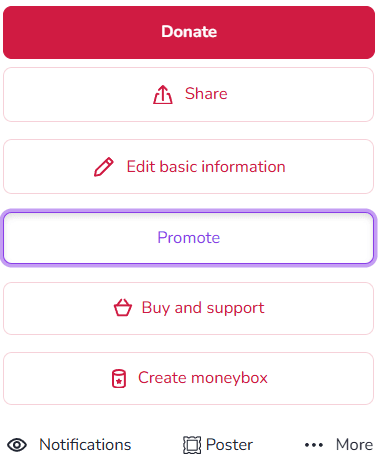
There are several ways to share a fundraiser with your friends. Here are some ideas:
- Share the link: You can share the link of the fundraiser with your friends through social media platforms like Facebook, Twitter, Instagram, or through messaging apps like WhatsApp or Telegram. Just copy the link and share it with your friends.
- Share via email: You can also send an email to your friends with the link of the fundraiser.
- Organise an event: You could organise an event like a fundraiser party or a charity walk and invite your friends to attend.
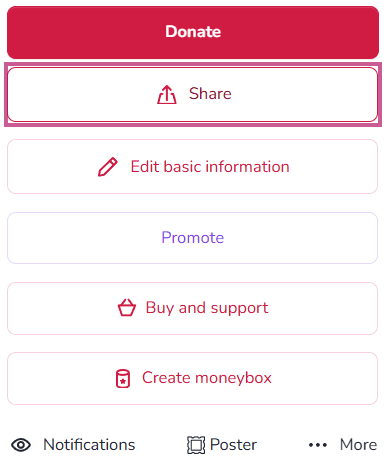
You can share any fundraiser by copying the url or by clicking on the dedicated 'Share' button on the fundraiser page. Your sharing makes a big difference - fundraisers shared on different channels raise as much as 6.5 times more funds on average!
Due to the very large number of requests, in our social media we only promote fundraisers selected by us. We encourage you to take a look at the articles in which we have collected tips to increase the effectiveness of fundraisers:
The promoted fundraiser feature is paid extra and you can purchase it by clicking the 'Promote' button on your fundraiser. The promoted fundraiser will be displayed here, and can also appear among fundraisers advertised on Facebook and Google Ads.
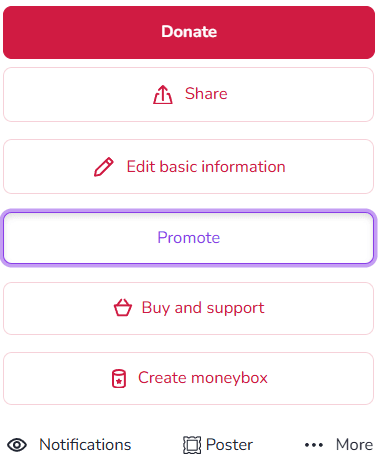
Our core services are completely free, but as an Organiser you can also purchase various promotion and enhancement options.
Are you looking for a fundraiser?
No answer to your question above?
Log in to write to us via the contact form.